Category: Newsletter Businesses

  • How to Reduce Newsletter Production Friction

    How to Reduce Newsletter Production Friction

    Newsletter production friction rarely announces itself as a single dramatic failure.

    More often, the issue takes longer than expected. Research keeps reopening. The draft changes direction halfway through. Sources must be found again during fact-checking. Formatting begins before the article is stable. Review comments conflict. The test email reveals preventable problems. Nobody is sure which version was sent.

    The natural response is to add another tool, template, automation, or checklist. That can make the system heavier without making the work easier.

    A better approach is to identify where friction becomes visible, trace where the problem actually begins, and make the smallest change that preserves quality while reducing delay, rework, uncertainty, or avoidable handoffs.

    What newsletter production friction looks like

    Production friction is any recurring condition that makes it unnecessarily difficult to move an issue from idea to reliable delivery.

    Common forms include:

    • Waiting: Work stops because a decision, source, approval, or asset is missing.
    • Searching: Files, links, prior decisions, or source notes cannot be found quickly.
    • Decision friction: The next action or responsible person is unclear.
    • Context switching: Attention moves repeatedly between research, drafting, formatting, administration, and review.
    • Handoff friction: The next person or system receives incomplete information.
    • Rework: A task must be repeated because an earlier decision or input was incomplete.
    • Tool friction: The platform requires unnecessary copying, rebuilding, or manual correction.
    • Quality friction: Important checks happen too late.
    • Access friction: Credentials, permissions, or account ownership block the work.
    • Capacity friction: The workload exceeds the time or review capacity available.
    • Dependency friction: One vendor, integration, or reviewer can stop the process.

    Not all friction should be removed. Fact-checking, accessibility review, link testing, and unsubscribe testing may feel slow because those steps protect readers and the publication.

    The goal is to remove avoidable friction without removing essential controls.

    Start with one real production cycle

    Do not redesign the workflow from memory.

    Observe one complete issue from intake through archive. Record each stage, start and stop times, waiting, interruptions, missing inputs, reopened decisions, manual copying, repeated searches, review corrections, tool failures, approval delays, and post-send fixes.

    Separate three kinds of information:

    • Fact: What was directly observed
    • Estimate: A reasonable approximation
    • Assumption: A belief that still needs testing

    For example:

    Fact: Final link testing found three outdated destination URLs. Estimate: Correcting and retesting the links added approximately 25 minutes. Assumption: The links became outdated because the source packet was created two weeks before drafting.

    Without this distinction, a publisher may automate the wrong step or blame a tool for a problem created upstream.

    Find where the friction begins

    The stage where a problem appears is not always where it started.

    When editorial review requires major rewriting

    The problem may begin with a vague brief, undefined reader outcome, angle chosen before evidence review, copied outline, competing ideas, or a topic that does not fit the promise.

    Adding another editing pass treats the symptom. Strengthening the brief may prevent the rewrite.

    When pre-send testing reveals broken links

    The problem may begin with search-result links, incomplete source records, early formatting, mixed source and reader-facing links, or an unreliable automation.

    A longer QA checklist may catch the problem. Better source handling may prevent it.

    When publishing repeatedly misses the intended day

    The problem may begin with too many active issues, research without a closing condition, unavailable reviewers, manual packaging, unrealistic cadence, unclear approval, or late angle changes.

    The correct response may be narrower scope, lower frequency, earlier review, or a clearer approval boundary.

    Use the Origin-to-Visibility Test

    For each recurring problem, answer:

    1. Where did the problem become visible?
    2. Where did the problem probably begin?
    3. What evidence supports that conclusion?
    4. What is the earliest safe point where the problem can be prevented?
    5. What control must remain after friction is reduced?

    This prevents controls from accumulating at the end while weak inputs remain unchanged.

    Reduce friction in the right order

    Use this sequence:

    1. Remove unnecessary work.
    2. Simplify what remains.
    3. Standardize stable recurring work.
    4. Automate only after the work is stable.
    5. Add capacity only when the process itself is sound.

    Starting with automation can make a bad process faster and harder to inspect.

    1. Remove unnecessary work

    A task may no longer deserve a place when nobody uses its output, the same data is entered in several systems, another control provides the same protection, an old tool or retired feature created the task, or formatting adds no comprehension value.

    Before removing a step, determine whether it protects accuracy, source traceability, consent, suppression, accessibility, security, payments, disclosures, recovery, or correction history.

    Do not remove a protective control because its value is less visible than its cost.

    2. Simplify the work that remains

    Simplification reduces choices, inputs, or handoffs while preserving purpose.

    Examples include:

    • Use one issue brief instead of several planning documents.
    • Store sources in one claim-level register.
    • Maintain one authoritative draft.
    • Use one final approval path.
    • Reduce competing calls to action.
    • Retire unused audience segments.
    • Use one location for approved images and downloads.
    • Separate source notes from reader-facing links.
    • Replace a complex template with a minimum structural checklist.
    • Narrow cadence or scope when capacity is the true constraint.

    Ask: What is the minimum information or action required for this step to succeed safely?

    3. Standardize stable recurring work

    A standard-work card should define the trigger, required inputs, minimum steps, owner, exit evidence, failure response, and review date.

    Good candidates include creating the issue brief, opening the source packet, closing research, preparing drafts for editorial and fact review, packaging, test sending, approval, archiving, and recording the cycle lesson.

    Standardize the operating handoff, not the thinking. A source analysis, comparison, correction, and implementation guide should not all use identical editorial structures.

    4. Automate stable handoffs

    Automation fits when a step repeats consistently, inputs and outputs are defined, failure can be detected, the action is reversible, sensitive data is controlled, and a responsible owner remains visible.

    Reasonable candidates include creating issue records, folders, approved metadata, review notifications, reminders, routine checklists, send-completion records, and archive moves.

    Poor candidates include approving factual claims, choosing sensitive guidance, inferring consent, reversing suppression, or publishing automatically because a deadline arrived.

    Google Search’s guidance on generative AI content says generative AI can assist with research and structure, but generated outputs can contain inaccuracies. Google advises manual fact-checking and review of AI-assisted content, including titles, descriptions, structured data, and image alt text.

    Automate stable handoffs, not unresolved judgment.

    5. Add capacity only after fixing the process

    Sometimes a reasonable workflow still lacks capacity. Responses may include reducing frequency, narrowing scope, separating editorial and administrative work, assigning a fact-checker, reserving packaging time, establishing absence coverage, or adding support capacity.

    Before adding a person, confirm that inputs, ownership, outputs, exit conditions, source locations, approvals, and escalation paths are clear.

    Reduce decision friction with exit conditions

    Research is complete when:

    • Material claims have suitable support.
    • Important limitations are documented.
    • Meaningful source conflicts are understood.
    • A missing source would materially change the issue.
    • More reading is unlikely to change the conclusion.

    The outline is complete when:

    • The reader outcome is clear.
    • Each section performs a necessary job.
    • Evidence has a planned location.
    • The issue boundary is visible.
    • The next action is appropriate.

    The draft is ready for editorial review when:

    • The reasoning is complete.
    • The issue delivers distinct value.
    • Obvious placeholders are resolved.
    • Major structural choices are settled.

    The draft is ready for fact review when:

    • Major restructuring is complete.
    • Material claims are identifiable.
    • Source links are available.
    • Recommendations are distinguishable from facts.

    Packaging is complete when:

    • Subject and preview text are approved.
    • Links are final.
    • Images and alt text are ready.
    • Disclosures are present.
    • Plain text is usable.
    • Archive fields are prepared.

    Pre-send QA is complete when:

    • The actual test email has been checked.
    • Material failures are closed.
    • The authorized owner approves the send.
    • Final files and source records are recoverable.

    Exit conditions reduce the recurring question: “Is this ready yet?”

    Separate preparation from execution

    Before drafting, have an approved brief, defined angle, source packet, current outline, relevant prior issues, required disclosures, asset requirements, review requirements, and realistic send window.

    Before packaging, have stable content, approved links, final images, alt text, call to action, subject direction, disclosure language, and archive destination.

    Before review, specify the requested review, sensitive claims, what changed, what is out of scope, the deadline, and what constitutes approval.

    Give each tool one primary role

    • Idea system: Captures and triages possible issues
    • Issue record: Shows stage, owner, blocker, and next action
    • Source system: Preserves evidence and claim support
    • Writing environment: Holds the current editorial draft
    • Email platform: Packages, tests, schedules, and sends
    • Archive: Preserves final issues, assets, sources, and corrections
    • Automation layer: Connects stable handoffs
    • Dashboard: Shows exceptions and bottlenecks

    Avoid copying the same status into several tools unless a real operational requirement justifies it.

    For the complete issue lifecycle, read How to Build a Repeatable Newsletter Production Workflow.

    Reduce research friction without lowering the evidence standard

    Use a claim-first process:

    1. Identify the material claim.
    2. Define what evidence would support it.
    3. Start with the most authoritative available source.
    4. Record the source date and limitation.
    5. Stop when the claim is adequately supported.
    6. Reopen research only when review identifies a material gap.

    Keep the source title, publisher, location, publication date, access date, supported claim, limitation, and replacement trigger.

    Reduce review friction by defining review roles

    Editorial review

    Focuses on reader value, structure, originality, clarity, tone, repetition, and scope.

    Fact and source review

    Focuses on accuracy, source support, dates, numbers, quotations, limitations, and current requirements.

    Compliance or specialist review

    Focuses on sensitive claims, legal or regulatory boundaries, privacy, security, health, financial risk, and disclosures.

    Production review

    Focuses on formatting, links, accessibility, mobile presentation, plain text, sender identity, unsubscribe behavior, and archive fields.

    Do not ask every reviewer to perform every review.

    Reduce tool friction with ownership and recovery

    For each critical tool, document its purpose, owner role, administrator access, data stored, export method, recovery path, integrations, failure effect, and replacement trigger.

    A fast workflow that cannot be recovered is not durable.

    Do not optimize only for speed

    A change is not successful if it saves time while increasing corrections, unsupported claims, reader confusion, broken links, accessibility problems, unsubscribe failures, privacy exposure, review omissions, lost source context, archive gaps, or dependence on one person or vendor.

    Google’s people-first content guidance asks whether content provides original information or analysis, treats the subject substantially, adds value beyond rewriting sources, uses descriptive titles, and shows care in production. Those protections should remain when the workflow is simplified.

    Run one friction-reduction experiment

    Choose one recurring problem and record the baseline evidence, root-cause hypothesis, proposed change, introduced risk, expected signal, retained quality control, rollback method, and review date.

    Then run one complete cycle.

    Example

    Observed friction: Fact review repeatedly returns the draft for major restructuring.

    Hypothesis: Fact review begins before editorial structure is stable.

    Change: Require editorial approval before fact review starts.

    Expected signal: Fewer structural changes after claim verification begins.

    Quality control retained: Every material claim still receives fact and source review.

    Rollback: Restore parallel review if sequential review creates unacceptable delays.

    The change succeeds only if rework falls without reducing accuracy or creating a new bottleneck.

    Use a friction budget

    Protective friction

    Necessary to protect readers, records, or the publication. Examples include fact-checking, sourcing, accessibility, unsubscribe testing, sensitive-claim approval, and backup verification.

    Usually retain it while simplifying the surrounding handoff.

    Reducible friction

    Necessary work performed inefficiently, such as repeatedly finding files, re-entering metadata, manually creating identical folders, waiting because ownership is unclear, or reviewing unstable drafts.

    Simplify or standardize it.

    Avoidable friction

    Work with no continuing value, including duplicate reports, unused fields, redundant approvals, obsolete segments, discarded formatting, or duplicate tools.

    Remove it safely.

    Unknown friction

    The purpose or consequence is unclear. Investigate before changing it.

    The objective is not zero friction. It is the right friction in the right place.

    Know when the real problem is the promise or cadence

    The newsletter model may need to change when every issue exceeds available research capacity, the publication covers unrelated subjects, timely updates demand constant monitoring, the promise keeps changing, audiences need conflicting content, filler becomes necessary, archives cannot be maintained, or support work exceeds editorial work.

    Possible responses include narrowing the topic, reducing frequency, publishing seasonally, separating alerts from durable issues, removing a feature, pausing, or merging publications.

    For topic-level sustainability, read How to Choose a Newsletter Topic You Can Sustain.

    The final friction test

    The workflow has improved when the current stage is visible, the next action is clear, inputs are available before work begins, research has a closing condition, review roles are distinct, handoffs include completion evidence, material failures still stop the send, the issue remains recoverable, corrections can be traced, fewer steps need rescue work, and the process survives a disrupted week.

    Friction reduction is not the elimination of care.

    It is the removal of avoidable work so that attention remains available for the parts requiring judgment.

    Last reviewed: November 2026. Search and AI guidance can change. Verify current official documentation when applying search-related or automated-production recommendations.

    Reduce newsletter production friction

    The companion workbook includes a 14-stage friction map, time and rework log, intervention record, standard-work cards, automation gate, and experiment review.


  • How to Organize Newsletter Ideas Without Building a Content Backlog

    How to Organize Newsletter Ideas Without Building a Content Backlog

    A long list of newsletter ideas can feel like an asset.

    Often, it is unfinished work disguised as abundance.

    Every saved headline quietly creates another open decision: Is this worth publishing? Who is it for? Does it fit the newsletter? What evidence would support it? Is it timely? Does it overlap with something else? When will someone review it? Can it be deleted?

    When those decisions are postponed, the idea list becomes a backlog. The publisher may have hundreds of topics but still struggle to choose the next useful issue.

    The solution is not to capture fewer ideas. It is to stop treating every captured idea as a commitment.

    A practical newsletter idea system should:

    • Capture signals without developing them immediately.
    • Triage ideas before they enter production.
    • Limit the number of active concepts.
    • Park deferred ideas only when a reason to revisit them exists.
    • Archive completed and rejected ideas outside the active workspace.
    • Review the system often enough to remove expired and duplicated work.

    The objective is not to preserve every thought. It is to make the next editorial decision easier.

    An idea inbox is not a content calendar

    An idea inbox captures raw signals. A triage queue supports decisions. An active pipeline contains committed work. A content calendar schedules approved work. An archive preserves history and learning.

    Problems begin when the inbox, backlog, pipeline, calendar, and archive are treated as one interchangeable list.

    Replace the backlog with a five-part pipeline

    Use five distinct locations:

    1. Inbox
    2. Triage queue
    3. Active pipeline
    4. Parking lot
    5. Archive and learning log

    An idea should move because a decision was made, not merely because time passed.

    1. Capture the signal, not the finished headline

    A raw idea usually begins as evidence that something may matter: a recurring reader question, an official update, a process failure, a gap in an earlier issue, an expiring comparison, or a downloadable asset that needs explanation.

    Capture enough context to preserve the signal:

    • Raw signal: What was observed?
    • Source type: Reader question, official update, process failure, search behavior, research, or another source
    • Reader or situation: Who encounters the problem?
    • Why it may matter: What could become clearer, easier, or safer?
    • Evidence location: Where can the original signal be found?
    • Timing: Is the idea durable, seasonal, time-sensitive, or expiring?
    • Next review: When should someone decide what happens?

    Do not write the outline during capture. Expanding every idea immediately creates context switching and turns the inbox into an unreviewed draft collection.

    2. Triage with five decisions

    Develop

    Develop an idea when the reader problem is clear, the idea fits the newsletter promise, the issue can add distinct value, suitable evidence appears available, the timing makes sense, and production capacity exists.

    Combine

    Combine ideas when several entries represent the same underlying problem. Combining protects the newsletter from publishing thin variations of the same answer.

    Hold

    Hold an idea when it may be useful but is not ready because a source update is pending, a prerequisite should publish first, capacity is unavailable, evidence is weak, or a seasonal window has not arrived.

    Every held idea needs a review date or trigger. Otherwise, Hold becomes a permanent backlog.

    Discard

    Discard an idea when it does not fit the promise, the reader problem is unclear, the subject is already covered, suitable evidence is unavailable, the useful answer is too small for an issue, the topic requires unsupported expertise, or the idea has expired.

    Discarding protects editorial attention.

    Investigate

    Investigate when a factual question must be resolved before the editorial decision is possible. Investigation should end in Develop, Combine, Hold, or Discard.

    Use four gates before development

    Gate 1: Reader problem

    Express the idea as a problem, decision, responsibility, or recurring situation.

    Weak: “Newsletter growth tips.”

    Stronger: “A small publication has several signup sources but cannot identify which sources produce readers who understand the newsletter promise.”

    Gate 2: Promise fit

    Would a reasonable subscriber expect this issue based on the signup description? A useful idea can still belong somewhere else.

    Gate 3: Distinct value

    Identify what the issue adds: a decision framework, failure analysis, implementation method, original research, maintained reference, source comparison, practical audit, worked example, correction, or tool.

    “Summarize what other sources already say” is not enough.

    Google Search Central recommends assessing whether content provides original information or analysis, treats the subject substantially, adds value beyond rewriting sources, and is produced with care for a defined audience.

    Gate 4: Evidence readiness

    Classify evidence as Ready, Partial, Weak, or Unavailable. Do not start drafting a factual issue in the hope that support will appear later.

    Limit work in progress

    A backlog grows when too many ideas are treated as active simultaneously.

    A practical starting limit for a solo publisher is:

    • Up to three active concepts before drafting
    • One active draft
    • One issue in final review
    • Everything else remains in triage or the parking lot

    This is a starting point, not a universal standard. Adjust it for cadence, complexity, review requirements, and capacity.

    An active idea should have a current stage, reader outcome, angle, evidence status, owner, target window, blocker, exit condition, and last-updated date.

    If nobody can state the next action, the idea is stalled or parked rather than active.

    Do not schedule undefined ideas

    A content calendar should contain work that is sufficiently defined to schedule.

    Premature scheduling can force weak sources, repeated advice, filler, boundary drift, skipped review, and manufactured timeliness.

    Schedule only when the reader problem, angle, evidence, promise fit, production burden, review capacity, and timing reason are clear.

    Build a parking lot that expires

    Every parked idea should contain:

    • Reason for deferral
    • What must change
    • Evidence to watch
    • Review trigger
    • Review date
    • Responsible role
    • Expected decision

    Useful triggers include an official report, finalized policy change, repeated reader questions, publication of a prerequisite issue, new data, a seasonal window, or restored capacity.

    “I might want this someday” is not a review trigger.

    At review, reactivate, combine, discard, or deliberately extend the hold.

    Archive ideas without losing the lesson

    Use a separate archive and learning log for published, combined, expired, discarded, or reframed ideas.

    Record the original concept, final outcome, reason, closure date, reader signal, production lesson, reusable source or asset, and follow-up trigger.

    The archive preserves reasoning without keeping closed work psychologically active.

    Organize around reader problems, not keyword piles

    Search research can identify language and related questions. It should not become an automatic issue generator.

    A keyword export often contains slight query variations, unclear intent, off-topic phrases, questions already answered well, and topics without credible evidence.

    Google’s spam policies prohibit scaled content created primarily to manipulate rankings with little or no added value. The purpose and reader value matter more than the production method.

    Before creating an issue from a keyword, identify the reader problem, decision or action, distinct contribution, evidence, publishing rationale, and relationship to existing issues.

    If those elements are missing, keep the phrase as research evidence rather than a publishing assignment.

    Separate evergreen, timely, and maintenance ideas

    Evergreen ideas

    Evergreen ideas address recurring problems, but they still require periodic review.

    Timely ideas

    Record the earliest useful date, expiration date, required source, fallback if the source is delayed, and whether the issue retains value after the event.

    Maintenance ideas

    Maintenance ideas update, correct, merge, or repair earlier work. Give them a visible lane so they do not compete invisibly with new issues.

    Use recurring editorial questions

    Organize ideas around recurring questions:

    • What changed?
    • What decision is the reader facing?
    • What failed and why?
    • What should be implemented?
    • What should be audited?
    • What evidence is misunderstood?
    • What needs maintenance?
    • When should the reader stop or seek specialized help?

    These questions create editorial range without requiring hundreds of speculative titles.

    If the broader topic itself is unstable, use How to Choose a Newsletter Topic You Can Sustain before expanding the pipeline.

    Turn reader replies into evidence carefully

    Capture an anonymized summary, recurring situation, number of independent signals, secure source location, quotation permission requirements, and limitations.

    Do not enter unnecessary names, addresses, customer details, account data, or confidential circumstances into a general idea system.

    One detailed question may justify a direct reply. Several independent questions may justify an issue.

    Schedule two review rhythms

    Weekly triage

    Use a short, fixed review to clarify signals, combine duplicates, discard misfits, promote ready ideas, assign investigations, and add review dates.

    The purpose is decision-making, not brainstorming.

    Monthly pipeline review

    Review untriaged age, stalled work, bottlenecks, overlap, parked ideas without triggers, expired ideas, recurring reader problems, source gaps, useful follow-up signals, and inputs that should stop entering the system.

    For the downstream production process, see How to Build a Repeatable Newsletter Production Workflow.

    Measure flow, not inventory size

    Useful operating measures include:

    • Age of the oldest untriaged idea
    • Number of active concepts
    • Number of stalled ideas
    • Time from capture to triage
    • Time from development to decision
    • Percentage of parked ideas with valid triggers
    • Ideas combined because of overlap
    • Published issues producing useful follow-up signals
    • Repeated rejection reasons
    • Recurring source bottlenecks

    Do not turn these measures into arbitrary publishing quotas.

    Common backlog traps

    Capturing complete article titles

    A polished title creates a false sense that the issue is already defined. Capture the problem first.

    Saving every source as a separate idea

    Several sources may support one issue. Sources belong in a source packet, not as competing backlog entries.

    Treating “not now” as permanent preservation

    If no review trigger exists, the idea is simply undecided.

    Using the calendar as motivation

    A date cannot create evidence or distinct value.

    Keeping ideas because work was invested

    Past effort is not a reason to continue an issue that no longer fits.

    Confusing quantity with resilience

    A hundred weak ideas do not create a sustainable newsletter. A small pipeline tied to recurring reader problems is more useful.

    Use the minimum idea record

    Before triage, record:

    • Signal: What happened or was observed?
    • Reader: Who encounters the situation?
    • Problem: What becomes difficult, unclear, or risky?
    • Value: What could the issue add?
    • Evidence: Where might support come from?
    • Timing: Is it durable, timely, seasonal, or expiring?
    • Decision date: When will it be triaged?

    After triage, add:

    • Decision: Develop, combine, hold, discard, or investigate
    • Reason: Why?
    • Next action: What happens now?
    • Owner: Who is responsible?
    • Exit condition: What must be true before it moves again?

    That is enough structure to support a decision without creating administrative work larger than the idea itself.

    The final principle

    An editorial system should make ideas easier to evaluate, not harder to abandon.

    Capture freely, but commit selectively.

    Keep the active pipeline small. Park ideas only with a reason to return. Archive decisions outside the working view. Let stale and weak ideas expire.

    The useful asset is not the longest list of possible issues. It is a reliable process that turns real reader signals into a small number of well-supported, distinct, maintainable publications.

    Last reviewed: November 2026. Google Search guidance and policies can change. Verify current official documentation when applying search-related recommendations.

    Build a controlled newsletter idea pipeline

    The companion workbook includes a lightweight inbox, five-outcome triage queue, work-in-progress-limited pipeline, expiring parking lot, archive, and monthly review.

  • When to Add a Paid Newsletter Option

    When to Add a Paid Newsletter Option

    A paid newsletter should not begin with a paywall.

    It should begin with evidence that a specific group of readers needs something valuable enough, distinct enough, and dependable enough to justify an ongoing payment.

    That is a higher standard than having a growing free list, strong open rates, encouraging replies, a large social following, several months of consistent publishing, or access to a payment-enabled platform.

    Those signals may support further testing. None proves that readers will purchase a recurring subscription or that the publisher can fulfill the paid promise sustainably.

    The right time to add a paid option is when five conditions exist together:

    1. Free readers already receive a clear and useful newsletter.
    2. A defined group has a recurring need for additional value.
    3. The paid offer is meaningfully different without weakening the free edition.
    4. The operator can fulfill, support, correct, and maintain the offer reliably.
    5. The complete commercial journey, including billing, cancellation, access, exports, and retirement, has been tested.

    A paid option is not simply a locked version of the free newsletter. It is a recurring commercial commitment.

    Start with the problem payment would solve

    Do not begin with: “What content can I put behind a paywall?”

    Begin with:

    What recurring reader problem requires additional work, access, speed, depth, or accountability that the free newsletter does not provide?

    A paid option may solve a legitimate problem by providing:

    • Earlier access to time-sensitive analysis
    • Deeper research with documented sources
    • A maintained reference database
    • Specialized implementation guidance
    • Regular audits or decision tools
    • A curated briefing for a narrow professional responsibility
    • Office hours or structured member support
    • Access to a carefully moderated specialist community
    • Downloadable assets that require continuing maintenance
    • A searchable archive organized for a specific workflow

    The word more is not enough. More emails, words, links, and frequent sends do not automatically create paid value. The additional material must make something meaningfully clearer, easier, faster, safer, or more usable for a defined reader.

    Protect the free newsletter first

    A paid option should build on a functioning free newsletter rather than compensate for an unclear one.

    Before introducing payment, confirm that the free edition has:

    • A recognizable reader
    • A stable editorial promise
    • A realistic cadence
    • Consistently useful issues
    • Appropriate sourcing
    • Working signup and unsubscribe processes
    • A recoverable archive
    • A repeatable production workflow
    • A correction process
    • Evidence that readers understand why the newsletter exists

    Do not deliberately reduce the usefulness of the free edition to manufacture demand for the paid tier.

    A healthier structure is:

    • Free edition: A complete and useful publication with a clear purpose
    • Paid edition: A distinct extension requiring additional research, maintenance, access, support, or production

    For the operating foundation, see The Minimum Viable Newsletter System.

    Use the Eight-Condition Paid Readiness Test

    1. Readers express a recurring need

    Look for repeated evidence from different readers or situations.

    Useful signals include:

    • Readers independently asking for deeper treatment
    • Requests for more frequent updates on a narrow subject
    • Questions requiring research beyond a normal issue
    • Requests for a maintained tool, database, or archive
    • Readers asking for implementation support
    • Repeated interest in office hours or specialist discussion
    • Free readers already using the newsletter in a recurring workflow
    • Real purchase behavior during a clearly described pilot

    Weak signals include likes, poll votes without commitment, compliments, social follower counts, high open rates without purchase behavior, one reader asking for more content, or people saying they “would probably pay.”

    Interest and payment are different forms of evidence. A real transaction is stronger evidence than a hypothetical answer, but a few purchases still do not prove the model will scale or remain viable.

    2. The paid value is distinct

    Write the free and paid promises side by side.

    A credible distinction might be:

    • Free explains the recurring problem. Paid provides a maintained implementation system.
    • Free summarizes a material change. Paid analyzes operational impact for a narrow role.
    • Free publishes a monthly guide. Paid maintains a searchable database with continuing updates.
    • Free provides general education. Paid offers structured office hours within clear boundaries.
    • Free introduces a framework. Paid supplies updated tools, examples, and working sessions.

    A weak distinction sounds like paid subscribers receive the “real” information, free articles are intentionally incomplete, paid issues are simply longer, or the same issue arrives one day earlier.

    The paid edition should be independently defensible, not dependent on weakening the free one.

    3. The value can be repeated

    A one-time premium report may be a digital product. A paid newsletter requires a recurring reason to renew.

    Ask:

    • What new or maintained value appears each billing period?
    • Does the reader’s problem recur?
    • Can the work remain distinct issue after issue?
    • Can required sources be accessed consistently?
    • Does the promise depend on constant breaking news?
    • What happens during a quiet month?
    • What happens when the operator is unavailable?
    • Which benefits require maintenance between issues?

    If the best material can be completed once and sold without ongoing obligations, a one-time product may be a better fit.

    4. Delivery capacity is proven

    Payment increases the consequences of missed or weak delivery.

    Estimate the full burden:

    • Research and source verification
    • Writing and editing
    • Specialist review where needed
    • Formatting and distribution
    • Member administration
    • Billing support
    • Failed-payment handling
    • Refund requests
    • Corrections
    • Community moderation
    • Archive maintenance
    • Cancellation processing
    • Export and backup work

    Do not promise weekly delivery merely because weekly newsletters appear more valuable. The correct cadence is the fastest schedule that can be maintained without lowering the evidence, editorial, support, or correction standard.

    5. The economics are understandable

    Do not confuse gross subscription revenue with profit or available cash.

    Model monthly and annual prices, pilot members, platform charges, platform revenue share, payment-processing percentage, fixed transaction fees, recurring-billing fees, currency conversion, taxes, refunds, disputes, production tools, support tools, integrations, specialist review, owner labor, customer-support labor, and closure costs.

    For U.S. domestic card transactions, Stripe currently lists standard online payment pricing of 2.9% plus 30 cents per successful transaction. International cards, currency conversion, recurring billing, disputes, different payment methods, and connected platforms can add charges.

    A $10 subscription is not $10 of profit. Separate gross revenue, platform fees, processing, refunds, taxes, operating expenses, owner labor, net operating result, and cash timing.

    This article does not provide tax or accounting advice. Subscription tax obligations vary by jurisdiction, product, seller location, purchaser location, and platform arrangement.

    6. The commercial terms are clear

    Before purchase, readers should understand:

    • What is included and excluded
    • Price and billing frequency
    • Whether renewal is automatic
    • Trial terms and when charges begin
    • How cancellation works
    • When access ends
    • Refund policy
    • How price changes are handled
    • What happens to prior paid content
    • How support is provided
    • What happens if the paid option closes

    Do not hide material terms inside a long policy while checkout uses vague language.

    Subscription and negative-option requirements are legally sensitive and subject to change. The Federal Trade Commission’s current Negative Option Rule page reflects continuing regulatory activity. Verify current federal and applicable state requirements before launch rather than relying on an old summary.

    Obtain qualified legal guidance when cancellation, renewal, disclosure, refund, privacy, or tax obligations are unclear.

    7. The member experience has been tested

    A working payment button is not a complete subscription test.

    Test the entire journey:

    1. Offer page
    2. Checkout
    3. Purchase confirmation
    4. Member access
    5. First paid issue
    6. Monthly or annual renewal
    7. Failed payment
    8. Updated payment method
    9. Upgrade or downgrade
    10. Cancellation
    11. Refund request
    12. Support request
    13. Correction notice
    14. Content export or download
    15. Paid-option retirement

    Use controlled accounts and payment-provider test modes where available.

    Confirm what happens after purchase, cancellation, payment failure, card expiration, refund, or closure. Also test annual subscribers, complimentary accounts, founding members, and member-only community history where applicable.

    8. There is a stop rule

    Define the decision before launch.

    Review whether readers understand the promise, purchasers receive what they expected, labor remains sustainable, free-edition quality stays strong, paid claims can be sourced, billing and cancellation work, materials remain portable, and the subscription model fits better than a one-time product.

    The available decisions are:

    • Continue: Promise, fulfillment, support, and commercial controls work.
    • Change: A specific part of the offer needs revision.
    • Pause: Obligations cannot currently be met reliably.
    • Stop: The recurring model does not serve readers or cannot be operated responsibly.

    Choose the paid format before choosing the price

    Different paid formats create different burdens.

    Premium issues

    Best when recurring editorial analysis is the core value. The burden includes research, cadence, sourcing, correction, and reliable delivery.

    Maintained reference library

    Best when readers need organized material they revisit. The burden includes updates, navigation, version control, access management, and retiring obsolete entries.

    Alerts or early briefings

    Best when timeliness has genuine value. The burden includes monitoring, rapid verification, absence coverage, and avoiding manufactured urgency.

    Community or member discussion

    Best when member interaction adds substantial value. The burden includes moderation, conduct rules, privacy, member removal, and preventing unverified claims from appearing authoritative.

    Office hours or direct access

    Best when structured interaction is the product. The burden includes scheduling, attendance limits, scope boundaries, and avoiding a drift into regulated or personalized advice.

    Tools, templates, or databases

    Best when members use a maintained asset. The burden includes updates, compatibility, documentation, post-cancellation access, download security, and version history.

    The format determines the fulfillment system. Price should not be chosen before that burden is understood.

    Model platform economics carefully

    Substack

    Substack currently allows publishers to start without a software subscription charge and keeps 10% of each paid subscription payment. Separate Stripe processing and recurring-billing costs apply. Substack currently sets minimum prices of $5 per month and $30 per year for U.S.-dollar Stripe accounts.

    This reduces upfront software commitment but places a percentage cost on paid revenue.

    beehiiv

    beehiiv currently places paid subscriptions on its Lite plan, shown from $49 per month with annual billing at the checked 1,000-subscriber tier, and lists a 0% platform take rate. Payment processing and other operating costs remain separate.

    This creates a recurring platform charge before the offer proves itself, but no listed platform percentage on paid subscriptions.

    Ghost

    Ghost(Pro) currently places paid subscriptions on its Publisher plan, shown from $29 per month billed annually for up to 1,000 members, and lists 0% transaction fees from Ghost. Payment processing still applies.

    A self-hosted Ghost installation has a different cost and technical-responsibility model.

    These examples are not recommendations. Fees, thresholds, promotions, processor arrangements, and features can change. Recheck official pages immediately before selecting or enabling a platform.

    Do not set price from competitor averages alone

    Competitor pricing provides context but does not calculate the correct price for your offer.

    Consider the paid outcome, alternatives, frequency of use, production and maintenance cost, support burden, payment fees, refund exposure, expected members, monthly versus annual billing, long-term fulfillment obligations, price-change treatment, and a credible pilot price.

    Do not choose an artificially low price merely to make the first sale easier. A low price still creates support expectations, recurring billing, refunds, taxes, disputes, archive obligations, and a difficult future price transition.

    Price testing should use a real offer and an actual purchase decision. A poll asking “Would you pay $5?” is not enough.

    Use a founding pilot without inventing scarcity

    A founding pilot can limit risk when the terms are genuine.

    Define available places only when a real capacity limit exists, the enrollment window, pilot length, included benefits, delivery schedule, price, renewal, feedback process, support boundary, cancellation, refunds, post-pilot treatment, and whether the price continues.

    Do not claim limited availability when there is no true capacity or time limit. Do not use a countdown that resets. Do not call a price “lifetime” unless the meaning and closure conditions are carefully defined.

    A pilot reveals which benefits members use, what support work appears, whether cadence is sustainable, whether billing and access are reliable, and whether the free edition remains useful.

    Keep free and paid value in a healthy relationship

    A free newsletter can continue to explain foundational ideas, publish useful commentary, introduce frameworks, share selected resources, correct public errors, and help readers evaluate fit.

    A paid option can add maintained depth, specialized application, faster or structured access, member tools, detailed research, accountable support, or a continuously maintained knowledge asset.

    The paid tier should not make every free issue feel like an advertisement.

    Ask:

    If the paid option disappeared tomorrow, would the free newsletter still deserve a reader’s subscription?

    If the answer is no, redesign the relationship.

    Prepare for cancellation and retirement before launch

    Document how members cancel, when cancellation takes effect, whether access continues through the paid term, how refunds are evaluated, who handles disputes, what happens to annual subscriptions if the option closes, whether members retain downloads, whether the archive remains available, and how member records and suppression status are preserved.

    Stopping a paid option may mean closing enrollment, fulfilling remaining terms, converting members to free, issuing appropriate refunds, preserving an archive, offering future material as one-time products, retiring community features, or moving platforms.

    The exit plan is part of the offer design.

    The final decision

    Add a paid newsletter option when:

    • The free newsletter already works.
    • A defined reader group has a recurring additional need.
    • Paid value is distinctive and repeatable.
    • Delivery and support capacity have been demonstrated.
    • Costs and owner labor are understood.
    • Commercial terms are clear.
    • Purchase, access, renewal, cancellation, exports, and retirement have been tested.
    • The option can be changed or stopped without abandoning existing obligations.

    Do not add payment merely because the platform enables it or another newsletter charges.

    The decision is ready when the publisher can explain not only why someone would pay, but also how the promise will be fulfilled, corrected, supported, canceled, exported, and retired.

    Last reviewed: November 2026. Platform fees, processor pricing, tax treatment, and subscription rules can change. Verify current official sources and obtain qualified advice where needed.

    Decide whether your paid newsletter is ready

    The companion workbook includes an 18-part readiness decision, paid-offer design record, economics model, reversible pilot record, and member-experience and exit test.

  • Newsletter Asset Audit: What to Keep, Fix, or Remove

    Newsletter Asset Audit: What to Keep, Fix, or Remove

    A newsletter can keep sending on schedule while the underlying asset quietly becomes harder to trust, maintain, or move.

    The signup promise may no longer match the content. Old forms may collect subscribers under outdated language. Unsubscribed addresses may be vulnerable to reimport. Authentication records may include services that are no longer used. Strong issues may sit beside weak or obsolete pages. Nobody may have tested whether the archive and subscriber records can actually be exported.

    A newsletter asset audit asks four practical questions:

    • What should remain?
    • What needs correction?
    • What can be retired safely?
    • What requires investigation before anyone changes it?

    The objective is not to make the newsletter look busier. It is to leave the asset clearer, safer, more useful, and easier to operate.

    Use four audit actions

    Keep

    Use Keep when a component serves a defined reader need, matches the newsletter promise, has a clear owner, works as intended, can be maintained, and creates more value than burden.

    Keeping something does not mean ignoring it. Record why it remains necessary and when it should be reviewed again.

    Fix

    Use Fix when a component is still needed but has a correctable problem.

    Examples include an outdated signup promise, a broken source link, missing image alt text, an incomplete export procedure, an obsolete sender in SPF, or an integration with no assigned owner.

    A fix needs an owner, due date, and completion test.

    Remove

    Use Remove when a component no longer serves a legitimate purpose and can be retired safely.

    Examples may include an abandoned signup form, redundant automation, expired promotional sequence, unused integration, duplicate archive entry, or public page that cannot be maintained accurately.

    Do not remove records that may be needed for consent, suppression, billing, tax, disputes, contracts, or legal obligations without qualified review.

    Investigate

    Use Investigate when the evidence is incomplete or the consequences of a change are uncertain.

    Examples include an unfamiliar active segment, undocumented DNS record, unclear payment integration, old import with missing source context, or suppression list that appears redundant.

    “Investigate” is not a permanent holding category. Assign an owner and resolution date.

    Audit in a safe order

    Do not begin by deleting contacts or canceling tools. Follow this sequence:

    1. Define the audit boundary.
    2. Capture a recoverable baseline.
    3. Review the promise and audience.
    4. Inspect signup and consent pathways.
    5. Verify identity, authentication, and delivery controls.
    6. Sample recent editorial work.
    7. Inspect privacy, access, and integrations.
    8. Test archives and exports.
    9. Document costs and operating burden.
    10. Assign keep, fix, remove, or investigate actions.
    11. Prioritize remediation.
    12. Set the next review date.

    1. Define the audit boundary

    A complete audit may include signup pages, embedded forms, confirmation messages, welcome sequences, subscriber and suppression records, sending domains, DNS, recent issues, public archives, downloadable assets, automations, tags, user permissions, integrations, analytics, memberships, payment processors, invoices, backups, exports, and correction procedures.

    Also record what the audit does not cover. For example, the audit may check whether a privacy notice is present and consistent without attempting a jurisdiction-specific legal opinion.

    2. Capture a recoverable baseline

    Before changing anything, preserve the current state. Depending on the platform, save:

    • Subscriber or contact export
    • Unsubscribe and suppression data
    • Published-content export
    • Final copies of recent issues
    • Current signup forms and welcome messages
    • Domain and authentication records
    • Active integrations and user access
    • Paid-member records
    • Current plan and invoices
    • Public archive URLs
    • Records of important configurations

    Store the baseline in an appropriately secured location separate from the platform being audited.

    Do not place subscriber details, credentials, payment data, private correspondence, or individual consent records in a broadly shared audit workbook.

    3. Audit the promise

    Compare signup language with what the newsletter actually sends.

    Ask who the signup page says the newsletter is for, what help is promised, what frequency is implied, who is identified as sender, whether recent issues remain inside the boundary, and whether old forms still make an outdated promise.

    Do not rewrite the promise merely to justify everything the newsletter has drifted into. The better correction may be to narrow the content again.

    4. Audit every subscription pathway

    For each signup point, inspect the promise, sender identity, expected frequency, privacy link, fields collected, source tracking, success message, confirmation process, welcome message, tag assignment, and owner.

    Then test the pathway with a controlled address. Confirm that the correct messages arrive, source tracking works, unsubscribe functions, and the test address does not receive unrelated subscription messages.

    Remove abandoned forms only after checking whether external pages, QR codes, advertisements, downloads, partnerships, or automations still depend on them.

    5. Audit consent, status, and suppression

    The operation should distinguish among active, unconfirmed, unsubscribed, suppressed, bounced, complained, transactional-only, paid, complimentary, imported legacy, and unknown-source records where applicable.

    Review whether necessary context is preserved, including signup date and source, form or notice version, confirmation state, current status, unsubscribe date, suppression reason, preferences, and import source.

    Do not delete suppression records simply because they appear inactive. Suppression prevents opted-out or ineligible addresses from being added back to subscription campaigns.

    Gmail’s subscription guidelines recommend confirmed addresses, one-click unsubscribe for subscription messages, processing unsubscribes within 48 hours, separating subscription and non-subscription messages, and identifying each subscription list.

    6. Audit sender identity and authentication

    Document every visible From name, From address, Reply-To address, sending domain, authorized service, SPF record, DKIM status, DMARC record, reporting destination, DNS owner, and last verification date.

    Look for obsolete services in SPF, retired DKIM records, unmonitored Reply-To mailboxes, inconsistent identities, inactive DMARC report destinations, and domains without an accountable owner.

    Do not remove an unfamiliar DNS record until its purpose has been investigated.

    7. Audit deliverability using diagnostic evidence

    Do not evaluate deliverability solely through open rates.

    Where sufficient Gmail traffic exists, Google Postmaster Tools can provide spam rate, IP and domain reputation, feedback-loop information, authentication results, encryption, delivery errors, and compliance status. Google notes that the data is not real time and may be unavailable on low-volume days.

    Review provider warnings, bounce patterns, complaints, authentication failures, rejection errors, unsubscribe behavior, import history, and changes in volume or frequency.

    Do not diagnose a reputation problem from one metric. Record what the evidence establishes and what remains uncertain.

    8. Audit recent editorial value

    Review a representative sample, not only the best issue. Include recent, evergreen, timely, commercial, corrected, strong-response, and weak-response issues where available.

    For each issue, inspect:

    • Promise match
    • Distinct value
    • Source quality
    • Clarity and structure
    • Reader outcome
    • Maintenance need
    • Commercial integrity

    Google Search Central’s people-first guidance asks whether content provides original information or analysis, substantially covers the subject, offers value beyond rewriting sources, uses accurate descriptive titles, and demonstrates care. Those questions are useful when newsletter issues also exist as public pages.

    9. Audit the public archive

    Inspect navigation, search or topic structure, broken links, missing images, downloads, dates, corrections, duplicates, thin announcements, stale claims, orphaned issues, redirects, access status, disclosures, and author information.

    Assign page-level actions:

    • Keep when the issue remains accurate and useful.
    • Fix when an update can restore value.
    • Remove or redirect when the page is obsolete, duplicative, misleading, or impossible to maintain.
    • Investigate when traffic, links, member access, or obligations make removal consequences unclear.

    Removing weak content does not guarantee improved rankings or AdSense approval. The goal is a more coherent public asset.

    10. Audit accessibility and message quality

    Check heading hierarchy, descriptive links, image alt text, contrast, mobile layout, plain text, font size, reading order, button labels, form labels, error messages, keyboard access, and visible focus indicators.

    A technically delivered email can still be difficult to use. Fix barriers that prevent readers from understanding the content or completing essential actions.

    11. Audit privacy, access, and retention

    List every system receiving subscriber information, such as the email provider, website forms, analytics, CRM, ecommerce, payments, referrals, advertising, automation, surveys, support, file storage, and data warehouses.

    For each system, record the data received, purpose, owner, access roles, retention rule, export method, deactivation process, failure effect, and contractual dependency.

    Look for former users with active access, shared administrator accounts, unused integrations, excessive API scope, ordinary spreadsheets holding subscriber data, indefinite exports, and sensitive fields with no continuing purpose.

    12. Audit dependencies and recoverability

    Document the domain registrar, DNS provider, email platform, website, form provider, storage, payments, memberships, analytics, automations, referral tools, advertising networks, and specialist reviewers.

    For each dependency, ask what it does, who controls it, what happens if it fails, what data it stores, whether exports are complete, what fallback exists, and how long recovery would take.

    Run actual subscriber and content exports. Inspect the files rather than assuming an Export button proves recoverability.

    For a deeper ownership framework, read How to Build a Newsletter Asset Designed for Long-Term Use.

    13. Audit cost and operating burden

    Record the base plan, subscriber tier, sends, users, domains, hosting, payments, revenue fees, channels, transactional email, integrations, analytics, design, backups, migration, editorial labor, specialist review, support, corrections, and updates.

    Then identify which costs protect an essential control, which create reader value, which duplicate another tool, and which will change at the next realistic scale.

    Removing a low-cost control that protects consent, suppression, recovery, authentication, or security may create more risk than savings.

    14. Make the lifecycle decision

    Choose among:

    • Keep: The asset remains useful and supportable.
    • Fix: The purpose remains valid, but material controls or content need correction.
    • Remove components: Specific forms, pages, integrations, automations, or fields should be retired safely.
    • Merge: Another publication serves the same audience and purpose.
    • Pause: Obligations cannot currently be met reliably.
    • Retire: The reader problem, evidence, or operating capacity no longer supports publication.

    A retirement plan should address reader communication, paid members, cancellations or refunds, subscriber and suppression records, archives, redirects, downloads, domains, retention, integrations, payments, and future access to purchases or member content.

    Stopping publication does not automatically mean deleting the asset.

    Prioritize remediation by harm

    P0: Immediate containment

    Examples include publicly exposed subscriber data, unauthorized access, wrong-audience sends, suppression failures, broken unsubscribe, suspected account compromise, or materially broken paid access.

    Contain the issue, preserve evidence, and obtain qualified help where needed.

    P1: Correct this week

    Examples include authentication failure, unmonitored Reply-To, broken primary signup path, misleading promise, unsupported material claim, broken payment handoff, or missing required commercial-email element.

    P2: Correct this month

    Examples include incomplete exports, outdated welcome sequence, weak archive navigation, redundant integrations, inconsistent tagging, missing ownership records, accessibility defects, or stale public issues that can be repaired.

    P3: Improve later

    Examples include minor template inconsistencies, optional segmentation cleanup, noncritical reporting refinements, and cosmetic archive improvements.

    Priority should reflect potential harm, not convenience.

    What not to remove automatically

    Potentially important records include suppression lists, consent records, payment and cancellation history, tax records, dispute records, security logs, source packets, correction history, redirects, verification records, authentication records, disclosure versions, and purchase-access records.

    Classify uncertain items as Investigate.

    Create the final audit record

    For every material finding, record:

    • Evidence inspected
    • Finding
    • Risk if unchanged
    • Keep, fix, remove, or investigate action
    • Owner role
    • Due date
    • Completion evidence
    • Retest date

    The newsletter is ready to continue when critical controls work, reader value remains clear, essential records are recoverable, and the operating burden is understood.

    It does not need a perfect score. It needs no unresolved critical failure disguised as normal operation.

    Last reviewed: November 2026. Provider and legal requirements can change. Verify current requirements before making material compliance, retention, suppression, payment, or security decisions. This article provides operational education, not jurisdiction-specific legal advice.

    Audit your newsletter asset

    The companion workbook includes a 20-area audit, recent-issue sample review, dependency register, prioritized remediation plan, and lifecycle decision summary.

  • Newsletter Platform vs. Email Marketing Platform: Which Fits Your Model?

    Newsletter Platform vs. Email Marketing Platform: Which Fits Your Model?

    “Newsletter platform” and “email marketing platform” are often treated as interchangeable terms.

    They are not.

    Both can collect subscribers, send email, create forms, and report campaign activity. The difference is the operating model each platform is built to support.

    A newsletter platform usually treats the publication as the center of the system. The website, archive, issues, subscribers, recommendations, memberships, and paid content revolve around an ongoing editorial product.

    An email marketing platform usually treats the contact record and customer journey as the center. Campaigns, segments, events, purchases, automations, transactional messages, and other channels revolve around a person’s relationship with a business.

    Neither model is universally better. The right choice depends on what the email system must do when the newsletter becomes more complex.

    The short answer

    Choose a newsletter platform when:

    • The recurring publication is the main product.
    • Most subscribers should receive the same core issues.
    • A public archive or publication website matters.
    • Writers and editors are the primary operators.
    • On-platform discovery, recommendations, referrals, or memberships matter.
    • Paid subscriptions or publication-native advertising may become part of the model.
    • You want to manage the website and newsletter in one publishing workflow.

    Representative candidates include Substack, beehiiv, and Ghost. Their feature sets, prices, exports, and commercial terms differ and should be verified before selection.

    Choose an email marketing platform when:

    • Email supports a broader business rather than serving as the primary product.
    • Different contacts need different messages.
    • Behavior, purchases, tags, events, or lifecycle stages should trigger communication.
    • You need multistep automations or complex segmentation.
    • Transactional email, SMS, ecommerce, CRM, or sales data belongs in the system.
    • Marketing, sales, support, or ecommerce teams share contact information.
    • A separate website or content-management system already handles public publishing.

    Representative candidates include Kit, Mailchimp, and Brevo.

    Run a pilot before deciding when:

    • You need a public publication and behavioral automation.
    • Paid content and product marketing are equally important.
    • You already have a website but may benefit from publication-native discovery.
    • Your contact data is more complex than a subscriber list but simpler than a customer database.
    • Native platform features could create significant migration dependence.
    • The long-term model remains uncertain.

    The pilot should test a real signup, issue, automation, export, unsubscribe, and recovery process. Comparing editors or templates is not enough.

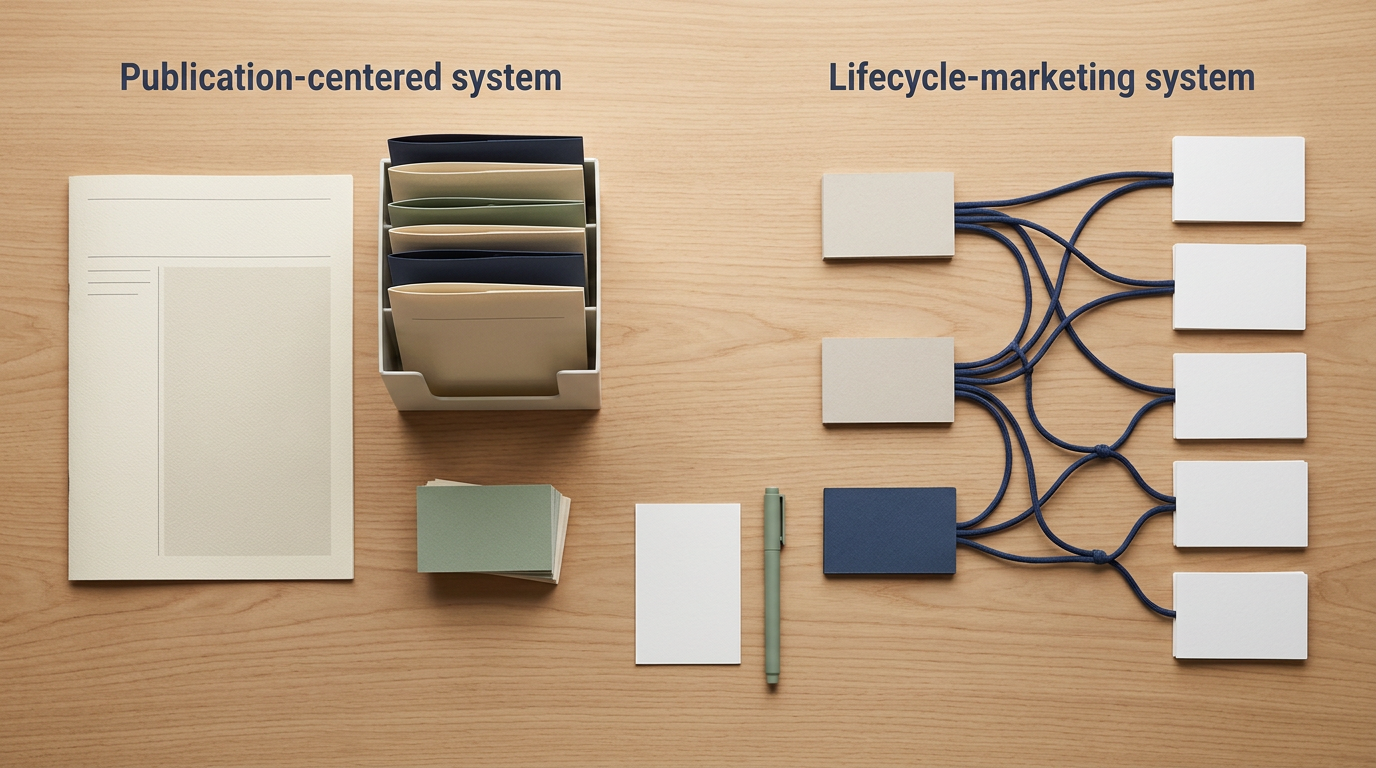
    The real distinction: publication versus lifecycle

    Ask one question first:

    Is the system primarily publishing to an audience, or managing communication across a customer lifecycle?

    A publication-centered system

    In a publication model, the issue is the primary operating unit. The system is organized around the next issue, the subscriber relationship, the public archive, reader discovery, free or paid access, and the recoverability of editorial work.

    The reader subscribes because the publication itself has a clear promise.

    A lifecycle-centered system

    In an email marketing model, the contact and the contact’s context are the primary operating units. The system is organized around segments, attributes, events, purchases, triggers, automation state, and coordination with sales, support, ecommerce, or transactional messaging.

    A recurring newsletter may still exist. It is one communication program inside a broader marketing system.

    Compare the audience model

    Newsletter platforms organize people around a publication

    A newsletter platform often begins with a comparatively simple subscriber model:

    • Subscribed or unsubscribed
    • Free or paid
    • Publication selected
    • Signup source
    • Basic engagement history
    • Tags, labels, or custom fields where supported

    That can be sufficient when the central commitment is: send this person the publication requested.

    Email marketing platforms organize people around attributes and actions

    An email marketing platform may support contact properties, tags, saved segments, website events, purchases, lead status, engagement scoring, forms submitted, automation state, sales activity, messaging permissions, and transactional context.

    Mailchimp currently lists segmentation, behavioral targeting, customer profiles, automation flows, transactional email, dynamic content, webhooks, surveys, and a broad integration catalog.

    Brevo positions itself as a multichannel customer platform covering marketing email, SMS, WhatsApp, transactional messaging, automation, sales features, and CRM functions.

    More data does not automatically create better marketing. It creates more fields, rules, integrations, privacy obligations, and failure points to govern.

    Compare the publishing surface

    Newsletter platforms often combine web and inbox publishing

    A publication may include a home page, web archive, individual posts, email delivery, topic navigation, member-only content, paid posts, recommendations, referrals, comments, community, podcasts, or video.

    Substack combines web and email publishing with Notes, recommendations, chat, multimedia, paid subscriptions, and analytics. It also supports a connected domain and data export.

    beehiiv bundles newsletters with a website, podcast, community, digital products, recommendations, analytics, monetization, and plan-dependent automation.

    Ghost combines a website, newsletters, memberships, protected content, paid subscriptions, themes, integrations, and managed hosting through Ghost(Pro).

    This combined surface can reduce the need to connect a separate website and email system. It also makes native publication features part of the migration decision.

    Email marketing platforms may treat public content as supporting infrastructure

    Email marketing platforms commonly provide forms, landing pages, campaign pages, basic websites, content studios, surveys, commerce pages, or hosted archives. These can be useful without becoming the organizing center of the product.

    That can be an advantage when WordPress, Shopify, or another system already owns the public site.

    Compare automation depth

    A welcome email exists in both models. That overlap can make the categories look more similar than they are.

    Publication-oriented automation

    Typical uses include welcome sequences, post delivery, referral prompts, paid-member onboarding, trial or upgrade messages, renewal communication, reactivation, and publication-specific segmentation.

    Marketing-oriented automation

    Typical uses include form-triggered sequences, lead nurturing, purchase journeys, abandoned-cart messages, website-event triggers, product-interest segments, contact scoring, sales handoffs, transactional messages, and multichannel campaigns.

    Kit currently offers broadcasts, forms, landing pages, tagging, segmentation, and digital-product or subscription sales on its free plan. Paid tiers add visual automations, sequences, applications, integrations, and other capabilities.

    Brevo currently lists multistep marketing automation, web and event tracking, advanced segmentation, A/B testing, transactional messaging, and additional channels across its plans.

    If the requirement is “send this publication to people who requested it,” a publication platform may be sufficient. If it is “send a different message based on what this contact did, bought, requested, or failed to complete,” an email marketing platform is more likely to fit.

    Compare monetization models

    Publication-native monetization

    Newsletter platforms may include paid subscriptions, membership tiers, paywalled posts, trials, gift subscriptions, sponsorships, ad networks, recommendations, digital products, tips, or donations.

    Substack includes free and paid publication tools, trials, gifts, and group plans.

    beehiiv places paid subscriptions and ad monetization on its Lite plan and currently lists a 0% platform take rate for paid subscriptions. Payment-processing charges and other terms remain separate.

    Ghost supports memberships and paid subscriptions through Stripe. Ghost states that it takes no platform transaction fee, while Stripe processing charges still apply.

    These capabilities do not prove that a paid publication will attract customers or earn a particular amount.

    Business-centered monetization

    Email marketing platforms may support product sales, ecommerce, courses, memberships, downloads, lead generation, appointments, retention, upselling, transactional messaging, or additional channels.

    Kit includes digital-product and subscription sales. Mailchimp connects with systems including Shopify, WooCommerce, QuickBooks Online, Salesforce, and Zapier.

    Choose the model whose transaction, customer-data, support, and export boundaries match the actual business.

    Compare the pricing model, not just the displayed price

    The lowest headline price can hide the wrong cost structure.

    Subscriber or member pricing

    beehiiv currently offers a free plan for up to 2,500 active subscribers. Its pricing page showed Lite from $49 per month with annual billing and Pro from $95 per month with annual billing at the checked tier. beehiiv states that active subscribers are totaled across publications in the workspace when determining the applicable tier.

    Ghost(Pro) currently shows Starter at $15 per month billed annually for up to 1,000 members, Publisher at $29, and Business at $199, with different feature and usage limits.

    Contact and feature pricing

    Kit currently shows a free plan supporting up to 10,000 subscribers. For 1,000 subscribers, the Creator plan is displayed at $33 per month when billed annually. Promotions and Pro pricing should be checked directly before purchase.

    Mailchimp prices by contacts, plan, and send allowance. Its public page currently shows a basic free tier at low volume, Essentials from $13 per month, and Standard from $20 per month. Overages can apply.

    Send-volume pricing

    Brevo combines plan, monthly email volume, stored contacts at some tiers, and add-ons. Its pricing page currently shows Starter from $9 per month and Standard from $18 per month. Brevo’s help center states that the free plan permits 300 daily sends and storage for up to 100,000 contacts.

    Model the full operating cost

    Include:

    • Base subscription
    • Contact, subscriber, or member tier
    • Monthly send volume
    • Additional users
    • Automation tier
    • SMS and other channels
    • Transactional email
    • Custom domain or hosting
    • Payment processing
    • Platform revenue fee
    • Integrations
    • Migration
    • Design or theme work
    • Backups
    • Operator labor
    • Specialist support

    Last reviewed: November 2026. Prices, limits, promotions, and plan contents can change. Verify current official documentation before committing.

    Compare ownership and portability

    A downloadable contact list is necessary. It is not a complete migration plan.

    Subscriber or contact export

    Verify that exports preserve email address, subscription status, signup date and source, consent context, confirmation state, suppression status, tags, segments, required custom fields, paid status, and publication membership.

    Substack allows a subscriber-list export to CSV. Its current help page says fields may include subscription date, plan type, opens, and post views, depending on the export, but full subscriber names are not currently included.

    “Exportable” does not mean every field will transfer.

    Content export

    Verify posts, issues, subject lines, dates, tags, authors, images, attachments, member status, public URLs, redirects, themes, routes, and corrections.

    Ghost documents exports for content and settings in JSON, members in CSV, post analytics in CSV, installed themes, redirects and routes, and media files on Ghost(Pro).

    Automation portability

    Contacts and tags may export. Triggers, conditions, delays, branches, exclusions, goals, scoring, webhooks, ecommerce events, transactional templates, and failure handling often must be rebuilt.

    Native-network portability

    Recommendations, discovery feeds, native comments, referral networks, community activity, and platform-specific analytics may not follow the publication to a new provider.

    These features can be valuable. Recognize them as dependencies.

    Compare privacy and consent obligations

    The platform does not make an email program compliant by itself.

    The operator still must understand what the person requested, where and when signup occurred, which notice was displayed, what data is collected, which integrations receive that data, how suppression is preserved, who can export the database, and what happens after unsubscribe.

    A newsletter platform with fewer fields may reduce data complexity. An email marketing platform with detailed behavioral data may support better targeting while increasing privacy, access-control, retention, and documentation obligations.

    Choose the smallest data model that supports the actual communication.

    Six vendor profiles without declaring a universal winner

    Substack

    Substack is publication-centered. It may fit when the publication is the primary product, built-in discovery matters, and advanced customer-lifecycle automation is not the primary need.

    Inspect paid-subscription terms, exact export fields, custom-domain behavior, native-network dependence, and migration of paid relationships.

    beehiiv

    beehiiv is publication-centered with growth, analytics, monetization, recommendation, and plan-dependent automation tools.

    Inspect plan-specific features, total active subscribers across all publications, analytics-history limits, automation depth, export scope, and monetization terms.

    Ghost

    Ghost combines an owned website, newsletter, memberships, protected content, paid subscriptions, themes, integrations, and broad export options.

    Inspect managed versus self-hosted responsibility, plan limits, technical maintenance, Stripe dependence, migration of media, and custom integrations.

    Kit

    Kit sits between the categories. It is creator-focused but operates as an email marketing platform with broadcasts, forms, landing pages, tags, segmentation, automation, sequences, integrations, and digital-product sales.

    Inspect paid-plan automation requirements, subscriber-tier pricing, collaboration needs, commerce terms, public archive expectations, and export coverage.

    Mailchimp

    Mailchimp provides broad email marketing, audience management, segmentation, automation, dynamic content, surveys, transactional email, reporting, and integrations.

    Inspect contact counting, send limits, overages, plan-specific automation, audience structure, transactional arrangements, and total cost at expected scale.

    Brevo

    Brevo emphasizes multichannel communication, including marketing email, transactional email, SMS, WhatsApp, automation, sales functions, and CRM-related features.

    Inspect send limits, stored-contact limits, automation limits, add-on costs, channel pricing, and export coverage for contacts, events, automations, and transactions.

    Use the nine-decision fit test

    1. What is the primary product? Publication or broader business communication?
    2. Does public discovery matter? Is the archive and native network central?
    3. How different are the messages? Shared publication or behavior-based journeys?
    4. Which data must the system understand? What is genuinely required?
    5. Which monetization path is real now? Separate present needs from speculative options.
    6. What determines total cost? Model the next realistic scale point.
    7. What must be exportable? Include status, consent, suppression, content, automation, payments, and analytics.
    8. Which native feature creates the greatest lock-in? Choose the dependency consciously.
    9. What is the smallest realistic pilot? Test the full operating path.

    Run a realistic pilot

    A useful pilot contains:

    • One public signup point
    • One confirmed or appropriately documented subscription path
    • One complete issue
    • One welcome or lifecycle automation
    • One unsubscribe test
    • One subscriber or contact export
    • One content export
    • One cost projection at the next realistic tier
    • One documented migration gap

    A trial that only tests the editor does not answer the platform question.

    For the minimum technical and consent foundation, read The Minimum Viable Newsletter System. For the issue-production process, read How to Build a Repeatable Newsletter Production Workflow.

    Common selection mistakes

    Choosing the platform with the largest feature list

    Unused features still create cost, configuration, training, and governance questions.

    Choosing based on the free tier

    The important cost is the first paid tier required by the real workflow, followed by the next realistic scale point.

    Treating audience ownership as a CSV checkbox

    Ownership also includes consent context, suppression, content, domains, archives, automations, payment relationships, and recovery instructions.

    Assuming a native network guarantees audience growth

    Discovery features may help people encounter a publication. They do not guarantee relevant subscribers or durable demand.

    Building complex automation before the newsletter promise works

    Automation scales a process. It does not repair an unclear publication.

    Ignoring migration until the platform becomes limiting

    Test an export before the platform contains years of content, automation, customer data, and payment relationships.

    Final decision

    Choose a newsletter platform when the publication, archive, and subscriber relationship are the operating center.

    Choose an email marketing platform when contact data, behavior, transactions, segmentation, and lifecycle automation are the operating center.

    Choose a hybrid or pilot only when the requirements genuinely cross both models.

    The best fit is not the platform with the most features. It is the system whose native structure matches the work you can responsibly maintain, whose costs remain understandable at the next realistic scale, and whose essential records can be recovered when the platform changes.

    Choose the platform model that fits your operation

    The companion workbook includes a model-first fit matrix, a November 2026 vendor snapshot, a total-cost model, a migration test, and a final decision record.

  • How to Build a Repeatable Newsletter Production Workflow

    How to Build a Repeatable Newsletter Production Workflow

    A newsletter workflow is not repeatable because every issue follows the same template.

    It is repeatable when the work moves through clear stages, important decisions are recorded, and the publisher does not have to reconstruct the process before every send.

    The objective is not to remove editorial judgment. It is to protect that judgment from preventable chaos.

    A dependable workflow should help you:

    • Decide whether an idea deserves an issue
    • Gather evidence without disappearing into research
    • Define the issue’s distinct value
    • Draft without mixing every task together
    • Review facts and sensitive claims
    • Package and test the actual email
    • Stop a send when a material problem remains
    • Preserve the finished work
    • Improve the next cycle using observed evidence

    That requires more than an editorial calendar. It requires a controlled path from intake to archive.

    The workflow in one view

    A practical newsletter production workflow has 12 stages:

    1. Intake
    2. Triage
    3. Evidence gathering
    4. Angle selection
    5. Outline
    6. Draft
    7. Editorial review
    8. Fact and source review
    9. Packaging
    10. Pre-send quality assurance
    11. Send
    12. Archive and cycle review

    Each stage should have an entry condition, a defined task, an owner, an exit condition, evidence that the work is complete, and a rule for what happens when the stage fails.

    1. Intake: capture the reason for an issue

    A production cycle should begin with a reader problem, change, question, or observation, not a blank subject-line field.

    Ideas may enter through reader replies, repeated questions, official updates, new research, changes to a product or process, gaps in the public archive, or problems discovered while maintaining earlier issues.

    Record who raised the question, what situation created it, whether the problem recurs, how it fits the newsletter promise, what evidence may be required, and what would make the issue useful rather than merely current.

    Do not begin full research during intake. Preserve the signal before deciding whether it deserves production.

    2. Triage: decide what enters production

    Turn each idea into one of four decisions:

    • Keep: The idea fits the promise and can create distinct reader value.
    • Combine: The idea belongs with another related question.
    • Defer: The idea may be useful, but evidence, timing, or capacity is not ready.
    • Reject: The idea is outside the boundary, repetitive, weakly supported, or primarily promotional.

    Evaluate promise fit, reader consequence, distinct value, evidence availability, real timing, and production burden.

    If topic selection remains unstable, use How to Choose a Newsletter Topic You Can Sustain before optimizing production.

    3. Create an issue brief before gathering sources

    Document the reader, recurring problem, promise match, intended outcome, primary angle, distinct value, evidence plan, sensitive claims, maintenance risk, boundary, target send, and stop condition.

    The brief prevents research from silently changing the intended issue. If evidence changes the angle, revise the brief consciously.

    4. Build a bounded source packet

    Research should end when the issue has enough credible evidence to deliver its intended value, not when every possible source has been collected.

    For each material claim, record:

    • Claim or section supported
    • Source title and publisher
    • Public location
    • Publication or update date
    • Access date
    • Intended use
    • Known limitation
    • Verification status

    Prefer primary and authoritative material when appropriate: laws and official guidance, provider documentation, technical standards, original research and datasets, qualified institutional guidance, and strong secondary analysis.

    Do not use a search-result snippet as the sole support for a material claim.

    5. Choose the issue angle after reviewing evidence

    The topic explains what the newsletter covers. The angle explains what this issue contributes.

    Useful angles include explanation, decision, application, failure analysis, audit, update, source analysis, and boundary guidance.

    Write the angle in one sentence:

    This issue helps [reader] decide or do [specific outcome] by explaining [distinct contribution].

    If that sentence is unclear, the issue is not ready for an outline.

    6. Build the outline around the reader’s decision

    Each section should perform a job:

    1. Opening signal: Identify the situation that makes the issue relevant.
    2. Core answer: Give the central conclusion early.
    3. Reasoning: Explain evidence, tradeoffs, or mechanism.
    4. Application: Translate the idea into a realistic action.
    5. Boundary: Explain what the guidance does not establish.
    6. Next step: Give one appropriate action.
    7. Source notes: Attribute material and changing claims.

    Place sources in the outline before drafting so evidence is not added afterward merely to decorate completed claims.

    7. Draft in separate passes

    Pass 1: Complete the reasoning

    Write the full argument or procedure without trying to perfect every sentence.

    Pass 2: Strengthen reader value

    Add the distinction, example, method, or tool that makes the issue worth sending.

    Pass 3: Remove unsupported certainty

    Separate established facts, source-supported interpretations, assumptions, recommendations, and open questions.

    Pass 4: Improve the language

    Remove filler, repeated points, artificial transitions, exaggerated claims, and generic motivation.

    Pass 5: Confirm the next step

    Do not leave the reader with information but no appropriate action.

    8. Separate editorial review from fact review

    Editorial review asks whether the issue serves the promise, provides obvious value, uses the right structure, sounds natural, and contains anything removable.

    Fact and source review asks whether material claims are supported, current, accurately represented, appropriately limited, and linked to the correct authority.

    Keep these reviews distinct enough that neither disappears into a vague instruction to “edit the draft.”

    9. Use AI as an assistant, not the source of truth

    AI can help organize notes, compare drafts, identify repetition, propose structure, or flag unclear language. It should not become an unverified authority.

    Google Search Central says generative AI can assist research and structure, while warning that models may produce inaccuracies. Google advises manual review of AI-assisted content, including titles, descriptions, structured data, and image alt text.

    For AI-assisted production:

    • Preserve original sources.
    • Check factual claims against those sources.
    • Do not invent reader experiences, customers, quotations, tests, or outcomes.
    • Do not treat fluent wording as evidence.
    • Confirm the draft adds original value.
    • Remove language that could appear in any newsletter.
    • Apply human review before sending.

    10. Package the issue only after content review passes

    Packaging includes the subject line, preview text, From and Reply-To details, headings, links, images and alt text, disclosures, call to action, plain-text version, and public archive fields.

    The subject line should represent the issue accurately rather than manufacture urgency.

    Weak:

    You are doing newsletters completely wrong

    Stronger:

    A 12-stage workflow for producing a newsletter issue

    The preview text should add context rather than repeat the subject. One relevant call to action is usually clearer than several competing offers.

    11. Run a real pre-send quality gate

    Send an actual test message and check:

    • From name, address, and Reply-To behavior
    • Subject and preview text
    • Desktop and mobile rendering
    • Plain-text version
    • Heading hierarchy and link text
    • Every destination URL
    • Image loading and alt text
    • Disclosures
    • Postal-address requirements where applicable
    • Visible and provider-required unsubscribe behavior
    • Public archive behavior

    For messages sent to personal Gmail accounts, Gmail’s sender guidelines require all senders to use SPF or DKIM, TLS, valid DNS records, standard-compliant formatting, and low spam rates. Higher-volume senders face additional SPF, DKIM, DMARC, and unsubscribe requirements.

    Gmail’s subscription guidelines recommend confirmed subscriptions, separate subscription and transactional messages, one-click unsubscribe, and honoring unsubscribe requests within 48 hours.

    For covered U.S. commercial messages, the FTC’s CAN-SPAM guide explains requirements involving accurate headers, nondeceptive subjects, applicable advertising disclosure, a valid postal address, and a clear opt-out method.

    Last reviewed: November 2026. Provider and legal requirements can change. Verify current requirements before implementation. This article provides operational education, not jurisdiction-specific legal advice.

    A quality gate should stop a send when a material failure remains open, including a broken unsubscribe, incorrect identity, unsupported sensitive claim, missing required disclosure, broken primary link, exposed private information, wrong audience, or material mobile failure.

    A deadline does not turn a failed check into a pass.

    12. Preserve a recoverable issue package

    After sending, save the final content, subject, preview text, send date, list identifier, source register, images, downloadable assets, public archive URL, disclosures, correction history, approval record, and production observations.

    Do not use the archive to collect unnecessary private correspondence. Summarize recurring questions without copying identifying details into broadly accessible files.

    For the technical and consent foundation around this workflow, see The Minimum Viable Newsletter System.

    Review the production cycle, not just the issue

    After each send, inspect weak briefs, excessive research, source gaps, outline changes, unsupported claims found late, approval delays, broken links, mobile fixes, incomplete archives, and reader confusion.

    For each bottleneck, record:

    1. What happened?
    2. At which stage did it become visible?
    3. Where did it actually begin?
    4. Was it isolated or recurring?
    5. What is the smallest preventive change?
    6. How will you know whether the change helped?

    Change one meaningful part at a time. More tools, reviewers, fields, and automations can increase handoffs without improving quality.

    Use service levels without turning publishing into a factory

    Possible operating expectations include:

    • Intake decision within two working days
    • Issue brief before research
    • Source packet closed before drafting
    • Editorial review after a complete draft
    • Fact review after major structural edits
    • Test send at least one working day before delivery
    • Archive completed within one working day after sending
    • Cycle review before the next issue enters drafting

    These are process examples, not universal standards. A time box should expose a problem, not force unsupported content forward.

    Do not automate an unstable workflow

    Automation is appropriate when the step repeats consistently, inputs and outputs are defined, failures can be detected, actions can be corrected, sensitive data is handled appropriately, and a responsible owner remains identifiable.

    Reasonable early candidates include creating issue records, generating routine folders, notifying reviewers, recording send completion, and scheduling review reminders.

    Poor candidates include approving factual claims, deciding whether a sensitive issue is safe, publishing without a quality gate, replacing consent records, resubscribing suppressed addresses, or sending generated issues without review.

    Automate stable handoffs, not unresolved judgment.

    The repeatability test

    The workflow is repeatable when:

    • A new issue enters through a defined intake point.
    • Every active issue has a current stage.
    • The next responsible role is visible.
    • Sources can be traced to claims.
    • Material failures stop the send.
    • The final package is recoverable.
    • Corrections can be documented.
    • One delayed person does not erase the process.
    • The system can survive a tool change.
    • The next issue benefits from the previous cycle’s evidence.

    Repeatability does not mean every issue takes the same time. It means the process remains understandable when the subject, complexity, or people involved change.

    The workflow in one sentence

    Brief the issue, gather bounded evidence, choose the angle, outline the value, draft the reasoning, review the content, verify the claims, package the email, test the actual message, send through an authorized system, preserve the record, and improve one recurring bottleneck.

    That is enough structure to make production reliable without turning the newsletter into an assembly line.

    Build your newsletter production workflow

    The companion workbook includes a 12-stage workflow map, reusable issue brief, claim-level source register, pre-send quality gate, and production-cycle review.

  • How to Choose a Newsletter Topic You Can Sustain

    How to Choose a Newsletter Topic You Can Sustain

    A newsletter topic can look promising for the first three issues and feel impossible by issue seven.

    The problem is rarely a complete lack of ideas. More often, the topic was chosen because it sounded interesting, marketable, or popular, but nobody tested whether it could support useful work over time.

    A sustainable newsletter topic sits at the intersection of four things:

    • A recurring reader problem
    • Reliable access to evidence and source material
    • Enough editorial range to avoid repetition
    • A production and maintenance burden you can realistically carry

    Passion can help. Search demand can help. Expertise can help. None of them is sufficient alone.

    The objective is not to find a topic you will “never get tired of.” It is to find a topic that continues producing legitimate reasons to contact a defined reader.

    Start with a recurring situation, not a broad interest

    “Productivity” is an interest.

    “Help independent consultants prevent client work from slipping between meetings” is a recurring situation.

    The second version gives the newsletter something to do. It identifies a reader, a problem, and a reason for future issues.

    A useful topic statement follows this structure:

    This newsletter helps [specific reader] handle [recurring situation] by providing [distinct type of help].

    Examples:

    This newsletter helps first-time nonprofit treasurers understand recurring financial-administration tasks by providing one plain-language operating guide each month.

    This newsletter helps small property managers identify preventable tenant-communication failures by examining one handoff, notice, or recordkeeping problem each week.

    This newsletter helps independent consultants improve client delivery by turning common workflow failures into practical operating changes.

    The topic does not have to appeal to everyone. A narrow, recognizable problem is more useful than a broad label that forces the newsletter to invent a new identity every week.

    Separate the topic from the format

    A topic describes the reader problem and editorial territory. The format describes how each issue delivers value.

    One topic could support:

    • A weekly field note
    • A monthly research brief
    • A practical case analysis
    • A curated source review
    • A decision memo
    • A recurring audit
    • A short implementation lesson

    Do not reject a strong topic because the first format you imagined feels difficult. Before abandoning the topic, test whether the format or cadence is the real problem.

    If you have not decided whether email is the right format, read Newsletter vs. Blog: Which Owned Asset Should You Build First?.

    Use the Seven-Dimension Topic Test

    A topic becomes sustainable when it passes seven connected tests.

    1. Reader specificity

    Ask:

    • Who is expected to recognize the problem immediately?
    • What responsibility, situation, or transition connects those readers?
    • What would make the newsletter feel unusually relevant to them?
    • Who is outside the intended audience?

    “Small-business owners” may be too broad. “Solo consultants handling multiple client projects” gives the publisher a clearer reader and editorial boundary.

    Reader specificity does not require demographic profiling. A shared task, responsibility, or problem is often more useful than age, income, or identity.

    2. Problem recurrence

    A newsletter needs a reason to return. A one-time question may support an article. A repeating responsibility is more likely to support a newsletter.

    Look for problems that recur because:

    • The reader performs the task regularly.
    • New information changes the decision.
    • The consequences vary by situation.
    • The reader moves through a repeating cycle.
    • Common failures appear in different forms.
    • Tools, rules, evidence, or practices change.
    • Experience creates new questions.

    Recurrence should come from the reader’s situation, not from the publisher’s need to send another email.

    3. Evidence access

    A sustainable topic needs dependable raw material, such as official documentation, public datasets, regulatory guidance, product manuals, industry standards, published research, repeated reader questions, observed process failures, or original analysis.

    A topic becomes fragile when every issue depends on private information, unverifiable social-media claims, anonymous anecdotes, inaccessible data, or technical claims beyond the publisher’s ability to verify.

    You do not need original data for every issue. You do need a reliable way to distinguish evidence from assumption.

    4. Editorial range

    A topic may contain dozens of possible headlines while supporting only one real idea. Test it across different kinds of value:

    1. Foundation explanation
    2. Comparison or tradeoff
    3. Failure analysis
    4. Implementation walkthrough
    5. Source analysis
    6. Reader-question response
    7. Audit or review method
    8. Boundary decision
    9. Update analysis
    10. Original framework or tool

    Write one possible issue for each category. If most ideas are minor variations of the same list, the topic may be too narrow. If every issue requires moving into a different subject, the topic may be too broad.

    5. Source and maintenance burden

    Every newsletter topic creates a maintenance obligation. Ask:

    • How quickly can the information become inaccurate?
    • Which claims require primary sources?
    • How often will links or tools change?
    • Does outdated information create meaningful risk?
    • Can corrections be issued clearly?
    • Can the operator maintain a source archive?
    • Does the topic require credentials or review the publication does not possess?

    A frequently changing topic is not automatically unsustainable. It simply requires more monitoring, sourcing, correction, and revision capacity.

    6. Production fit

    Estimate the work required for one credible issue: finding the angle, gathering and checking sources, creating an example or framework, drafting, editing, reviewing sensitive claims, formatting, testing links, sending, archiving, and handling replies.

    Then compare the workload with the proposed schedule. A topic requiring eight hours of research per issue will not fit a weekly newsletter with only two hours available.

    The answer may be to publish monthly, narrow the evidence scope, use a shorter format, separate timely updates from durable analysis, or remove sections that do not add meaningful value.

    For the smallest complete operating setup, see The Minimum Viable Newsletter System.

    7. Boundary strength

    A sustainable topic needs a visible edge. Write three boundary statements:

    • This newsletter covers…
    • This newsletter may mention…
    • This newsletter does not attempt to cover…

    For example:

    This newsletter covers systems for producing and maintaining a specialist publication. It may mention software when a tool materially affects the workflow. It does not attempt to provide general software reviews, legal advice, personal financial advice, or broad social-media news.

    A boundary protects the reader from random expansion and the publisher from an endless research obligation.

    Collect demand evidence without mistaking it for proof

    Useful signals include similar questions from different people, repeated support requests, search phrases expressing the same problem, relevant community discussions, replies to a small email test, and recurring process failures you can document.

    Record the exact observation and its limitation:

    • Observation: Five readers asked how to preserve email consent records.
    • Limitation: All five came from one professional community.
    • Next test: Publish a short guide and invite readers from two other relevant sources to respond.

    This prevents a weak signal from becoming a confident market claim.

    Use search tools as evidence, not as topic selectors

    Google Trends lets you explore search interest by time, location, and popularity. Its values represent normalized relative interest, not an exact count of searches or guaranteed demand.

    Google Ads Keyword Planner can suggest related keywords and provide monthly-search estimates. It is designed for Search campaigns, and its estimates should not be treated as predictions of newsletter growth or revenue.

    Use these tools to discover reader language, identify related questions, compare broader and narrower descriptions, notice seasonality, and detect ambiguity.

    Do not use them to conclude that a topic will produce subscribers, that search interest equals email interest, that a high-volume phrase is a good editorial position, or that advertising competition proves commercial viability.

    Run the Three-Issue Stress Test

    Before committing to a long publishing calendar, create three complete issue concepts that do different jobs.

    Issue 1: Explain

    Teach a foundational idea that the intended reader must understand.

    Issue 2: Decide

    Help the reader choose between real alternatives or evaluate a tradeoff.

    Issue 3: Apply

    Help the reader implement, inspect, or correct something.

    For each issue, document the reader problem, central value, evidence required, research time, writing and review time, distinct value, likely maintenance burden, and next question.

    The topic passes when all three issues are useful, meaningfully different, supportable with evidence, and producible within available capacity.

    The test fails when the issues repeat the same advice, require padding, depend on weak evidence, leave the topic boundary, or already demand unsustainable work.

    Distinguish expertise from topic ownership

    You do not need to be the world’s leading expert to publish a useful newsletter. You do need an honest relationship with the subject.

    That relationship may come from direct responsibility, documented process experience, technical skill, professional training, careful source analysis, original research, a disclosed learning project, or qualified contributors.

    Do not imply experience you do not have. If the newsletter is based primarily on research, say so. If it reflects hands-on work, explain the relevant context without inventing clients, results, or authority.

    Google Search Central encourages publishers to consider who created the content, how it was produced, and why it exists. Its quality questions emphasize original information, substantial treatment, clear sourcing, descriptive titles, and value beyond rewriting other sources.

    Watch for five false-positive topics

    1. The headline factory

    The topic produces unlimited list ideas but few distinct decisions or insights.

    Warning sign: Every issue is “seven tips,” “five tools,” or “ten trends.”

    2. The breaking-news trap

    The topic always has something new, but the newsletter cannot add useful interpretation.

    Warning sign: Most issues merely summarize announcements.

    3. The promotion wrapper

    The topic exists largely to create repeated opportunities to sell one product or service.

    Warning sign: Every issue reaches the same commercial conclusion regardless of the reader’s problem.

    4. The forced-expertise topic

    The subject appears lucrative, but the publisher lacks evidence access, relevant experience, or a responsible review process.

    Warning sign: Claims must be copied from summaries because the primary material cannot be evaluated.

    5. The boundaryless umbrella

    The topic can cover anything, making it difficult for readers to understand why they subscribed.

    Warning sign: The newsletter promise changes whenever the publisher encounters a new trend.

    Choose a cadence only after testing the topic

    Choose cadence by asking how often the reader’s situation creates a legitimate need, how long responsible research takes, how quickly information changes, whether each issue adds distinct value, and whether the process can survive a busy month.

    A strong monthly newsletter is more sustainable than a weekly newsletter built around filler.

    Define the decision before launching

    Set a review date after the three-issue test or initial publication period. Then choose one outcome.

    Continue

    Continue when the reader problem is recurring and specific, issues are genuinely different, sources are credible, production fits available capacity, and reader feedback creates useful next questions.

    Change

    Change when the reader is too broad, the promise is unclear, the format creates unnecessary work, the cadence is unrealistic, or one subtopic consistently produces stronger issues.

    Pause

    Pause when required sources are temporarily unavailable, production capacity changes, the quality standard cannot currently be met, or specialized review is needed.

    Stop

    Stop when the problem does not recur, the topic cannot produce distinct issues, evidence stays weak, maintenance cannot be sustained, or the newsletter must leave its boundary to continue.

    Stopping a weak topic preserves time and reader trust.

    Complete the final topic statement

    This newsletter helps [specific reader] handle [recurring situation]. Each issue provides [type of value] using [evidence or method]. It publishes [realistic cadence] because [reason the cadence fits]. It covers [boundary] and deliberately excludes [excluded areas]. After [test period or issue count], the topic will be reviewed using [evidence], leading to a decision to continue, change, pause, or stop.

    If you cannot complete the paragraph clearly, the topic needs more work.

    Choose a newsletter topic you can sustain

    The companion workbook includes a 14-part topic decision record, a 10-angle editorial-range test, an evidence log, and a continue, change, pause, or stop review.

  • The Minimum Viable Newsletter System

    The Minimum Viable Newsletter System

    A newsletter does not need a complicated automation stack to be real.

    It does need a complete path from voluntary signup to responsible delivery, unsubscribe handling, archiving, and review.

    That distinction matters. Many newsletter setups are technically busy but operationally incomplete. They have several forms, tags, sequences, and integrations, yet no clear subscription promise, reliable consent record, tested export, or process for handling a failed send.

    A minimum viable newsletter system is the smallest setup that can:

    • Explain what the reader is subscribing to
    • Record how the subscription occurred
    • Send a useful issue from a controlled identity
    • Let the reader reply or unsubscribe
    • Preserve the finished work
    • Recover essential records
    • Support a deliberate decision to continue, change, pause, or stop

    It is not the cheapest possible collection of tools. It is the smallest complete operating system.

    Begin with the path a subscriber takes

    Before choosing software, follow one subscription from beginning to end:

    1. A person encounters a clear invitation.
    2. The person submits an email address voluntarily.
    3. The system records the signup source and subscription context.
    4. The address is confirmed when appropriate.
    5. The subscriber receives the promised type of email.
    6. The subscriber can reply, update preferences, or unsubscribe.
    7. The system preserves the correct subscription or suppression status.
    8. The completed issue and its source material are archived.
    9. The operator reviews whether the newsletter remains useful and sustainable.

    If any step is missing, the system is not complete.

    This subscriber path also creates a useful boundary. Anything that does not support one of these steps probably does not belong in the first version.

    The 12 parts of a minimum viable newsletter system

    1. One specific reader problem

    The first component is not an email platform. It is a recurring problem that justifies future contact.

    Compare these two starting points:

    A weekly newsletter about independent business.

    One practical operating decision each week for consultants trying to make client work less dependent on memory.

    The second is easier to evaluate. A reader can understand the intended benefit, and the publisher has a boundary for deciding what belongs.

    A useful reader problem is:

    • Specific enough to recognize
    • Repeated rather than isolated
    • Appropriate for continuing communication
    • Supported by real questions or observations
    • Narrow enough to exclude unrelated topics
    • Broad enough to support more than one useful issue

    Do not create a complicated publishing system until you can describe the recurring problem in one sentence.

    If the format itself is still undecided, read Newsletter vs. Blog: Which Owned Asset Should You Build First?

    2. One clear subscription promise

    The subscription promise explains what will arrive and why it may be worth opening.

    It should identify:

    • The intended reader
    • The problem or responsibility being addressed
    • The kind of help each issue provides
    • A realistic indication of frequency
    • The identity of the sender

    Subscribe for [type of help] about [specific problem], delivered [realistic frequency] by [sender or publication].

    Avoid promises such as “unlock financial freedom,” “build passive income automatically,” “never struggle with content again,” “get guaranteed growth strategies,” or “receive everything you need to succeed.” These phrases are difficult to substantiate and give the reader little useful information about what will actually arrive.

    A strong promise reduces future production pressure because it tells the publisher what does not belong.

    3. One public signup point

    The minimum system needs one dependable place where a person can subscribe. That may be a dedicated landing page, a form embedded in a relevant article, a clearly labeled website section, or a public signup page supplied by the email service provider.

    The form does not need multiple incentives, quizzes, popups, and conditional paths. It does need:

    • A clear description of the newsletter
    • The sender or publication identity
    • The expected type of message
    • A link to relevant privacy information
    • A visible submission action
    • An accurate confirmation or success message
    • A process for recording the signup source

    The subscription invitation should not be hidden inside misleading language. A person should understand that submitting the form will result in recurring email.

    4. A subscription record with context

    An email address alone is not a sufficient operating record.

    The minimum useful record should preserve enough context to answer:

    • Where did the signup occur?
    • When did it occur?
    • What subscription promise or notice was displayed?
    • Was the email address confirmed?
    • What is the current subscription status?
    • Has the address unsubscribed or been suppressed?

    This does not mean that every reader needs a detailed behavioral profile. Collect only what the operation genuinely needs.

    The workbook accompanying this article intentionally does not store subscriber-level information. Personal records belong in an appropriately secured system with suitable access controls, not in an ordinary planning spreadsheet.

    5. A confirmation process

    A confirmed-email process asks the address holder to verify the subscription after submitting the form.

    Gmail Help recommends that recipients confirm their email address after entering it on a website or app. Google describes this as double consent. Google also recommends keeping subscription and non-subscription messages separate. Review Gmail’s email subscription guidelines for senders.

    Confirmation can catch accidental address errors, reduce unauthorized signups, clarify that the address holder requested the newsletter, improve the subscription record, and prevent an incentive from being delivered repeatedly to invalid addresses.

    Whether a particular confirmation approach is legally required depends on the applicable jurisdiction and circumstances. The general operational point remains: the system should be able to explain why each active address receives subscription messages.

    6. A controlled sending identity

    The newsletter should arrive from an identity that the operator controls and the reader can recognize.

    The minimum sending identity includes:

    • A domain controlled by the operator
    • An accurate visible From name
    • A stable From address
    • A monitored Reply-To address
    • Documented access to the domain’s DNS settings

    Avoid treating a no-reply address as the default simply because it reduces inbox management. Reader replies can expose confusion, errors, genuine questions, and emerging topics.

    A recognizable sender also makes the relationship easier to preserve if the underlying email platform changes.

    7. Basic email authentication

    Authentication should be treated as initial infrastructure, not a future upgrade.

    For messages sent to personal Gmail accounts, Google requires all senders to authenticate with SPF or DKIM, use TLS, maintain valid forward and reverse DNS records, follow standard message formatting, and keep reported spam rates low. Senders reaching close to 5,000 messages to personal Gmail accounts in a 24-hour period face additional requirements, including SPF, DKIM, and DMARC. Google calculates the volume across the same primary domain and treats a sender as a bulk sender permanently after that classification is reached. Review Gmail’s email sender guidelines.

    A minimum authentication record should document:

    • Which domain sends the messages
    • Which services are authorized in SPF
    • Whether DKIM signing is active
    • Whether DMARC exists
    • Where DMARC reports are directed
    • Who can change the DNS records
    • When the configuration was last checked
    • Which sending services should be removed if no longer used

    Do not copy DNS values from another newsletter. Authentication records are specific to the domain and sending services.

    Do not publish registrar credentials, recovery codes, API keys, private account identifiers, or screenshots that expose sensitive DNS-account information.

    8. One lightweight issue structure

    A minimum viable system needs a repeatable issue shape, not a rigid template that makes every email feel identical.

    1. The reason for this issue: Explain the situation or decision being addressed.
    2. The central idea: Deliver the main lesson without a long promotional introduction.
    3. A concrete application: Show how the reader might use, test, or evaluate the idea.
    4. One next step: Give the reader a practical action.
    5. Sources when needed: Attribute current, technical, legal, financial, or product claims.
    6. A reply prompt when useful: Ask a focused question capable of producing meaningful feedback.

    That is enough structure to prevent omissions without turning every issue into the same article. A comparison, short field note, source analysis, mistake review, and implementation guide should not all use identical sections.

    9. A pre-send quality check

    A newsletter should not depend on the publisher remembering every detail immediately before sending.

    The minimum pre-send check should cover:

    • Subscription-promise alignment
    • Factual accuracy
    • Subject-line accuracy
    • From and Reply-To information
    • Links
    • Mobile presentation
    • Plain-text readability
    • Image alt text when images convey information
    • Disclosures when applicable
    • Unsubscribe behavior
    • Archive and source preservation

    Send test messages to at least one desktop and one mobile environment available to the operator. Check the actual message, not just the editor preview.

    A test does not establish universal inbox placement. It can catch preventable formatting, identity, and link problems.

    10. A functional unsubscribe and suppression process

    Unsubscribe is not an optional footer decoration. It is part of the operating system.

    Google’s subscription guidance says senders should correctly implement one-click unsubscribe for subscription messages, require no additional user action for that method, and process unsubscribe requests within 48 hours.

    In the United States, the Federal Trade Commission explains that the CAN-SPAM Act applies to commercial email, including certain messages promoting content on commercial websites. Covered messages must use accurate header information, avoid deceptive subject lines, provide a valid physical postal address, and offer a clear way to opt out. The FTC also notes that business-to-business messages are not categorically exempt. Review the FTC’s CAN-SPAM compliance guide.

    The minimum system should:

    • Show a visible unsubscribe link
    • Support provider-required one-click behavior
    • Preserve suppression status
    • Prevent later imports from accidentally resubscribing an opted-out address
    • Provide a process for handling direct unsubscribe requests
    • Separate subscription messages from transactional messages where applicable
    • Test the unsubscribe path periodically

    Last reviewed: November 2026. Email-provider, privacy, and legal requirements can change. Verify current requirements with the relevant provider or regulator before implementation. This article provides operational education, not jurisdiction-specific legal advice.

    11. A durable archive and tested export

    A newsletter account is not the complete asset.

    Keep a recoverable copy of final issue content, subject line and preview text, publication or send date, source notes, images, downloadable materials, corrections, the public archive URL when one exists, applicable disclosure language, and significant reader questions without copying private correspondence into public files.

    Also test the platform’s exports. For subscriber records, check whether the export preserves current subscription status, signup date and source, confirmation status, tags or preferences, unsubscribe and suppression status, and required custom fields.

    For content, check whether the export preserves full issue copy, images, links, dates, subject lines, categories or tags, and attachments or downloadable assets.

    An export is useful only if you understand what it contains and what it leaves behind.

    For a deeper treatment of portability, read How to Build a Newsletter Asset Designed for Long-Term Use.

    12. A fixed review date and stop rule

    The minimum system needs a point at which the operator reviews the evidence.

    Thirty days may be enough to test whether the mechanics work. A longer period may be needed to evaluate whether the promise supports useful issues. Choose the review date before the initial enthusiasm fades.

    At the review, examine:

    • Whether the subscription promise remains accurate
    • Where legitimate signups came from
    • Whether the confirmation process works
    • Whether authentication remains valid
    • How long issues actually take to produce
    • Which reader questions recur
    • Whether unsubscribes and complaints are handled
    • Whether archives and exports are complete
    • Which dependencies create unacceptable risk
    • Whether the newsletter should continue, change, pause, or stop

    Do not use an arbitrary subscriber target as proof that the newsletter is viable. A large list with an unclear promise, poor consent history, or unsustainable production process is not a healthy system.

    What not to add yet

    A minimum viable newsletter usually does not need:

    • Multiple newsletters
    • Complex lead-scoring models
    • Dozens of audience segments
    • Large automated sequences
    • A referral program
    • A paid tier
    • Sponsorship operations
    • Advanced personalization
    • Several analytics platforms
    • Multiple overlapping signup incentives
    • An integration for every manual step
    • A second sending domain without a documented need

    Each addition creates another component to maintain, secure, explain, export, and eventually replace.

    Add complexity only when you can identify:

    1. A specific operating problem
    2. Evidence that the problem is recurring
    3. A component that addresses the problem
    4. The labor and dependency that component introduces
    5. A method for evaluating whether it helped

    “Other newsletters use it” is not sufficient evidence.

    A practical first-month sequence

    Before inviting subscribers

    • Define the reader problem.
    • Write the subscription promise.
    • Create one signup point.
    • Confirm that the privacy notice matches the form.
    • Configure the sending identity.
    • Set up and check authentication.
    • Test confirmation and unsubscribe behavior.
    • Document the system of record for subscriptions.

    Before sending the first issue

    • Write a complete issue that delivers the stated promise.
    • Check every factual claim that requires sourcing.
    • Verify the subject line and sender identity.
    • Test links.
    • Review the email on mobile.
    • Review the plain-text version.
    • Send a test message.
    • Confirm the unsubscribe path.
    • Save the final issue and source material.

    After each send

    • Confirm that the archive copy is complete.
    • Review replies and questions.
    • Record corrections.
    • Check delivery warnings.
    • Confirm that opt-outs were preserved.
    • Note any step that required avoidable rework.

    At the review date

    • Continue: The system works and the promise remains useful.
    • Change: A specific part of the promise or workflow needs correction.
    • Pause: The system cannot currently meet its obligations reliably.
    • Stop: The reader problem, operating capacity, or newsletter purpose no longer supports continued sending.

    The minimum system in one sentence

    One clear promise, one legitimate signup path, one controlled sending identity, one reliable issue process, one functional unsubscribe mechanism, one recoverable archive, and one scheduled review.

    Anything beyond that should earn its place.

    Map your minimum viable newsletter system

    The companion workbook includes a 12-stage system map, a pre-send readiness check, a dependency register, and a 30-day review.

  • Newsletter vs. Blog: Which Owned Asset Should You Build First?

    Newsletter vs. Blog: Which Owned Asset Should You Build First?

    A newsletter and a blog can eventually support each other. That does not mean you should build both at the same time.

    Each asset asks for a different kind of commitment.

    A newsletter requires permission to reach people directly, a reliable sending process, and a reason for subscribers to keep opening. A blog requires useful public pages, a navigable website, and the patience to build discovery over time.

    The better first asset is not the one that looks more profitable in someone else’s business. It is the one that gives you a credible way to reach the right people, learn from them, and maintain the work without spreading your attention too thin.

    The short answer

    Build a newsletter first if:

    • You already have access to a relevant group of people.
    • Direct replies would help you refine the idea.
    • The subject benefits from recurring commentary, curation, or timely guidance.
    • You can make a clear subscription promise.
    • You can sustain a dependable publishing rhythm.
    • You are prepared to manage consent, authentication, unsubscribes, and list hygiene.

    Build a blog first if:

    • People are likely to search for the questions you can answer.
    • Your strongest material is durable, detailed, and publicly useful.
    • You need content to remain findable after publication.
    • You want to establish a reference library before asking for an email address.
    • You can maintain a domain, publishing system, navigation, and content archive.
    • You can wait for discovery instead of relying on immediate distribution.

    Run a small paired test if:

    • One well-defined reader problem can support both formats.
    • You can publish one substantial public guide and a short email series without duplicating the same material.
    • You have a clear review date and will stop one format if the combined workload is not justified.

    Do not build two full publishing systems merely because both may be useful later.

    A newsletter and a blog create different assets

    The difference is bigger than “email versus website.”

    A newsletter creates a permission and communication asset

    The subscriber has taken an action that allows you to send future messages. That creates a direct communication channel, but it also gives you responsibilities.

    You need to know:

    • Why the subscriber is on the list
    • What the subscriber agreed to receive
    • Which address and domain send the messages
    • How someone changes preferences or unsubscribes
    • How consent and suppression records are preserved
    • Whether the list and publication archive can be exported
    • How frequently you can send something worth opening

    The value of the newsletter does not come from the size of a spreadsheet. It comes from a relevant promise, legitimate permission, consistent delivery, and continued reader trust.

    A blog creates a public knowledge and discovery asset

    A blog turns individual pages into a connected body of work that people can discover, reference, revisit, and share.

    You need to control:

    • The domain and hosting relationship
    • The publishing system
    • The content and media files
    • Navigation and internal links
    • Backups and recovery procedures
    • Redirects when URLs change
    • Page updates and corrections
    • Technical access for search crawlers

    The value of the blog does not come from publishing a large number of posts. It comes from building a coherent resource that answers real questions better than scattered, interchangeable pages.

    Google’s Search Essentials recommends creating helpful, reliable, people-first content, using the language people use to find it, placing descriptive terms in titles and headings, and making links crawlable. Meeting those practices does not guarantee that a page will be crawled, indexed, or ranked. Review Google Search Essentials.

    Start with your access advantage

    Can I reach the intended reader now, or do I first need to become discoverable?

    Choose the newsletter when relevant access already exists

    You may already have an active professional network, customers who requested continuing information, a community in which you participate, readers from an existing website, event attendees who knowingly subscribed, or people who repeatedly ask similar questions.

    This does not mean everyone you know belongs on a mailing list. Existing relationships are not automatic permission to send marketing or newsletter messages. Existing access simply makes it easier to present a clear invitation and see whether people voluntarily subscribe.

    A newsletter-first strategy is especially useful when replies can improve the work. A reader can respond with a question, correction, objection, or example. That feedback may reveal whether the newsletter promise is precise enough to support future issues.

    Choose the blog when discovery must come first

    A blog is often the better starting point when you possess useful knowledge but do not yet have a reachable audience. Public pages allow someone to evaluate the work before making a commitment.

    A blog-first strategy works well when the problem produces durable questions:

    • How does this process work?
    • What should I compare before choosing?
    • What information should I gather?
    • What causes a common failure?
    • How should I maintain or update the system?
    • When should I stop and seek qualified help?

    The pages must provide original value rather than merely rewriting information already available elsewhere. Google asks whether content offers original information or analysis, presents a substantial treatment of the subject, provides value beyond obvious summaries, and clearly communicates who created it, how it was created, and why. Review Google’s people-first content guidance.

    Compare the feedback loops

    Neither format guarantees useful feedback. The formats make different feedback available.

    Newsletter feedback is direct but selective

    A newsletter can reveal whether people voluntarily subscribe, which promise attracted them, which issues prompt useful replies, which questions keep recurring, whether the cadence is sustainable, and whether sending creates complaints or delivery problems.

    Open and click rates can add context, but they should not become the only measure of relevance. Privacy controls, mailbox behavior, automated scanning, and tracking limitations can affect those numbers. A thoughtful reply explaining what confused or helped a reader may be more useful than a higher open rate without context.

    Blog feedback is public but often slower

    A blog can reveal which questions attract relevant visitors, which pages earn referrals or citations, which sections people continue reading, which pages lead to another useful page, which queries expose a content gap, and which articles need updates.

    Search results can take time to develop, and publication does not guarantee indexing or visibility. A blog therefore requires patience before weak results can be interpreted responsibly.

    Compare shelf life and publishing pressure

    Newsletter attention is concentrated

    An email usually receives most of its attention near the send date. It may retain value through a searchable public archive, welcome sequence, topic collection, updated edition, later issue, or durable guide. Without an organized archive, useful newsletter work can disappear into individual inboxes.

    Blog attention can accumulate, but only with maintenance

    A public page can remain discoverable for years, but it is not permanently useful simply because the URL still works. Long-lived pages may need updated facts and links, revised examples, corrections, better navigation, consolidation, redirects, or removal when accuracy can no longer be maintained.

    A newsletter carries a recurring delivery obligation. A blog offers more scheduling flexibility but can make indefinite delay easier. Choose the pressure you are more likely to handle well: recurring newsletter delivery or sustained blog development without an inbox deadline.

    Compare the technical obligations

    Newsletter obligations

    • Legitimate subscription records
    • A sending domain you control
    • A monitored reply address
    • SPF, DKIM, and appropriate DMARC configuration
    • Clear unsubscribe handling and a suppression process
    • List hygiene and delivery monitoring
    • Exportable subscriber and content records
    • Separation between subscription and transactional messages where applicable

    Google recommends confirmed email addresses, one-click unsubscribe for subscription messages, processing unsubscribe requests within 48 hours, and separating subscription messages from non-subscription messages. Review Gmail’s email subscription guidelines for senders.

    Google also requires all senders to personal Gmail accounts to use SPF or DKIM, valid DNS records, TLS, compliant message formatting, and low reported spam rates. Senders exceeding 5,000 messages per day to personal Gmail accounts face additional requirements, including both SPF and DKIM, DMARC, and one-click unsubscribe for marketing and subscription messages. Review Gmail’s email sender guidelines.

    Commercial email may also be subject to legal requirements. In the United States, the CAN-SPAM Act covers commercial messages, including certain emails promoting content on commercial websites. Requirements include accurate sender information, nondeceptive subject lines, a valid physical postal address, and a clear opt-out method. Review the FTC’s CAN-SPAM compliance guide.

    Last reviewed: November 2026. Email-sender, privacy, and search requirements can change. Verify current requirements with the relevant provider or regulator before implementation. This article provides operational education, not jurisdiction-specific legal advice.

    Blog obligations

    • A domain under your control
    • Dependable hosting
    • A secure and maintained content-management system
    • Backups and redirect management
    • Crawlable navigation, descriptive URLs, internal links, and a sitemap
    • Page-performance monitoring and content updates
    • Privacy and disclosure pages appropriate to the site’s practices

    A blog avoids the operational burden of email delivery, but it introduces a different system that must remain secure, accessible, organized, and technically understandable.

    Compare what you actually own

    Neither format is fully owned if one vendor controls every important part.

    For a newsletter, preserve the sending domain, subscriber status and consent context, unsubscribe and suppression records, published issues, drafts, source materials, images, downloadable assets, signup forms, notices, automation logic, and recovery instructions.

    For a blog, preserve the domain registration, full content exports, media files, theme and layout records, redirect maps, DNS configuration, backup access, analytics history where export is available, and a record of plugins and integrations.

    “Owned” does not mean free from third-party services. It means critical components are identifiable, exportable where possible, and replaceable without destroying the underlying work. For a fuller treatment, read How to Build a Newsletter Asset Designed for Long-Term Use.

    Use the five-decision filter

    1. Where will the first relevant readers come from?

    Choose a newsletter first if you can present a legitimate signup invitation to an existing, relevant audience. Choose a blog first if public content must create the first point of discovery. Choose neither yet if you cannot identify a specific reader problem.

    2. What type of material can you produce repeatedly?

    A newsletter often fits editorial interpretation, curated developments, recurring observations, short practical lessons, timely commentary, and conversational sequences. A blog often fits detailed explanations, reference guides, durable comparisons, procedures, original frameworks, and resources that benefit from revision.

    Do not choose a format based only on what seems easier to write once. Consider what you can maintain after the initial enthusiasm fades.

    3. How quickly do you need feedback?

    Choose a newsletter first when direct replies can test the problem, promise, and language. Choose a blog first when the material needs to exist publicly before meaningful discovery can occur. Choose a small paired test when a strong public guide can attract the right reader while a short email sequence explores the problem more deeply.

    4. Which maintenance burden fits your operation?

    Choose a newsletter first if you can manage consent, deliverability, authentication, list hygiene, and recurring sends. Choose a blog first if you can manage hosting, security, navigation, indexing, page updates, and link maintenance.

    If neither burden is realistic, reduce the project. A simple landing page, a short public resource, or a limited email test can provide evidence without pretending that a complete publishing operation already exists.

    5. What will cause you to continue, change, or stop?

    For a newsletter, watch for voluntary signups from relevant sources, replies that reveal repeated problems, a promise that supports useful issues, a production process that fits available time, and manageable unsubscribe and delivery behavior.

    For a blog, watch for multiple substantial questions within one coherent subject, pages that provide more than a summary of existing material, relevant referrals or search impressions, clear follow-up questions, and a maintainable update burden.

    Do not turn an arbitrary traffic or subscriber target into proof of a viable business. These signals indicate whether the publishing asset is useful and sustainable, not what it will earn.

    Run the smallest credible test

    Newsletter-first test

    1. Define one specific reader problem.
    2. Write a precise subscription promise.
    3. Create a simple signup page.
    4. Invite people through a legitimate, relevant channel.
    5. Send three complete issues.
    6. Record signup sources, useful replies, recurring questions, production time, unsubscribes, and delivery problems.
    7. Review the evidence on a predetermined date.

    Blog-first test

    1. Define one focused subject.
    2. Identify three to five related questions that deserve substantial answers.
    3. Publish useful pages with clear navigation between them.
    4. Confirm that the pages are accessible to search crawlers.
    5. Record indexing status, relevant discovery, referrals, follow-up questions, and update burden.
    6. Review the evidence after the pages have had a reasonable opportunity to be discovered.

    Paired test

    1. Publish one substantial public guide.
    2. Offer a clearly described three-issue email sequence about the same underlying problem.
    3. Ensure the emails extend the guide rather than repeat it.
    4. Record how readers discovered the page, why they subscribed, what they asked, and how much work the combined system required.
    5. Keep both formats only if they perform different, useful roles.

    Common reasons to choose the wrong asset

    “A newsletter gives me direct access”

    Only after people knowingly subscribe. A purchased, scraped, assumed, or poorly documented list is not a trusted audience asset.

    “A blog brings free traffic”

    A blog does not automatically receive search visibility. Useful content, technical accessibility, competition, site reputation, and time all affect discovery.

    “I can repurpose everything”

    Repurposing works when the format changes the value. Copying a blog post into an email and calling it a newsletter does not create a distinct reason to subscribe.

    “I should launch both so I do not miss anything”

    Launching both can split research, production, technical maintenance, and quality control before either asset establishes a purpose.

    When building both makes sense

    A blog and newsletter work well together when each has a distinct job:

    • The blog provides durable, public reference material.
    • The newsletter interprets developments and invites replies.
    • The blog answers recurring questions discovered through email.
    • The newsletter brings readers back to materially updated resources.
    • Both use the same editorial boundaries and source standards.
    • The newsletter does not merely summarize every new post.
    • The blog does not become a transcript of every email.

    This is a connected publishing system, not two copies of the same content.

    If you start with the newsletter, The Minimum Viable Newsletter System defines the leanest workable components. If production burden becomes the main constraint, How to Build a Repeatable Newsletter Production Workflow addresses the operating process.

    Final decision

    Choose a newsletter first when direct permission, recurring communication, and rapid qualitative feedback are your strongest advantages.

    Choose a blog first when durable public knowledge, search discovery, and reference value are your strongest advantages.

    Run a paired test only when one reader problem can support both formats without doubling the work.

    The objective is not to predict which format will earn more. It is to identify the smallest owned asset you can build responsibly, learn from honestly, and maintain long enough to become useful.

    Choose what to build first

    The companion workbook includes a 10-factor decision record, an operating-fit comparison, three small test designs, and clear continue, change, or stop signals.

  • How to Build a Newsletter Asset Designed for Long-Term Use

    How to Build a Newsletter Asset Designed for Long-Term Use

    A newsletter can survive a slow month, a platform change, or a shift in your business, but only if you build more than a mailing list.

    The durable asset includes the list, the relationship with readers, the publishing process, the archive, the domain, the consent records, and the ability to move everything without starting over.

    That is a different goal from simply “launching a newsletter.”

    This guide will help you design a newsletter that remains understandable, maintainable, and portable over time. It will not promise passive income, rapid audience growth, or a particular financial result. A newsletter can support a business, but it also creates ongoing editorial, technical, privacy, and maintenance obligations.

    Start with the asset, not the platform

    It is easy to begin by comparing newsletter tools. That is often the wrong first decision.

    Platforms are replaceable. The underlying asset should remain recognizable when the software changes.

    A durable newsletter has six parts:

    • A defined reader problem: The recurring situation that gives someone a reason to subscribe.
    • A clear editorial promise: What a useful issue helps the reader understand, decide, or do.
    • A permission-based audience: People who knowingly asked to receive the newsletter.
    • A repeatable production system: A realistic way to research, write, review, and send issues.
    • A portable record: Exportable subscriber, content, consent, and operational data.
    • A lifecycle rule: A process for continuing, changing, pausing, or retiring the newsletter.

    If one of these pieces exists only inside a vendor account, you do not fully control it.

    1. Define the recurring reader problem

    A newsletter becomes difficult to sustain when its subject is broad but its purpose is vague.

    “Small-business advice” is a subject.

    “Help solo shop owners decide which operational problem to fix next” is a reader problem.

    The second version gives the newsletter a reason to exist. It also creates boundaries. You do not have to cover every small-business development, trend, or tool.

    Use this sentence:

    This newsletter helps [specific reader] handle [recurring problem] by providing [specific type of help].

    For example:

    This newsletter helps independent consultants improve inconsistent client handoffs by providing one practical operating change in each issue.

    Before committing to the idea, look for evidence that the problem repeats. Useful evidence can include:

    • Similar questions appearing in customer conversations
    • Search queries that reveal a recurring task or uncertainty
    • Reader replies describing the same obstacle in different words
    • Support requests or community discussions
    • A process you repeatedly explain to people
    • An existing article that attracts readers with the same problem

    One interested person is encouraging. A repeated pattern is stronger evidence.

    Do not invent demand because the topic sounds commercially attractive. Record what you actually observed and what remains an assumption.

    2. Write a promise that can survive changing topics

    A weak newsletter promise depends on constant novelty:

    Get the latest creator news every week.

    That promise creates an endless research burden and puts the newsletter in direct competition with faster sources.

    A more durable promise describes the value of the issue:

    Make one better decision about the audience, systems, or products you own.

    This promise can support timely news, evergreen guidance, case analysis, and practical tools without trapping the publisher in a single format.

    A useful promise answers three questions:

    1. Who is this for?
    2. What will become easier or clearer?
    3. What kind of email should the subscriber expect?

    Keep the promise narrow enough to guide editorial decisions but flexible enough to accommodate what readers need next year.

    If you still need to choose the subject, read How to Choose a Newsletter Topic You Can Sustain before deciding on frequency or monetization.

    3. Choose a cadence based on capacity, not ambition

    A newsletter is not durable if every issue requires a rescue operation.

    Estimate the actual work:

    • Finding and verifying sources
    • Developing the angle
    • Writing and editing
    • Creating images or downloadable materials
    • Formatting and testing
    • Reviewing links and disclosures
    • Sending the issue
    • Handling replies
    • Maintaining the archive
    • Monitoring bounced addresses and complaints
    • Updating automations and integrations

    Then choose the slowest cadence that still makes the newsletter useful.

    A well-developed monthly issue can create a stronger reader relationship than a hurried weekly email. Frequency should follow the promise. It should not be copied from another publisher’s schedule.

    For the first 90 days, a reasonable operating test is:

    • Publish three to six complete issues.
    • Record the time required for each stage.
    • Note where work stalls or needs to be repeated.
    • Collect reader questions and replies.
    • Review whether the cadence was sustainable without sacrificing accuracy.

    This is an operational test, not a promise of audience or revenue growth.

    The Minimum Viable Newsletter System covers the leanest workable setup. How to Build a Repeatable Newsletter Production Workflow addresses the production process in greater detail.

    4. Use a flexible issue architecture

    A repeatable structure reduces unnecessary decisions. It should not make every issue feel interchangeable.

    A durable issue may contain:

    1. The opening signal: Explain why the subject matters now or why the reader may be encountering it.
    2. The core decision or lesson: Deliver the main value without making the reader work through a long preamble.
    3. A concrete application: Show how the idea affects a real task, choice, or operating system.
    4. One practical next step: Give the reader something useful to do, document, compare, or reconsider.
    5. Source notes when needed: Attribute facts that are current, technical, legal, financial, or otherwise changeable.
    6. A meaningful reply prompt: Ask for information that can improve future issues, not merely generate engagement.

    The structure provides consistency. The substance should still vary.

    A comparison issue may need a decision framework. A technical issue may need a configuration checklist. A strategic issue may need a worked example. Do not force all three into the same template.

    5. Build on a domain you control

    Your newsletter platform may provide delivery, editing, payments, recommendations, or analytics. Those capabilities can be valuable, but the platform should not become the entire identity of the asset.

    Use a domain you control for the newsletter’s public presence and, where supported, its sending identity. Maintain access to the domain registrar and document the relevant Domain Name System settings.

    Email authentication is now part of basic newsletter infrastructure.

    Google requires senders to personal Gmail accounts to use SPF or DKIM authentication, TLS, valid DNS records, and compliant message formatting. Senders reaching roughly 5,000 or more Gmail messages per day face additional requirements, including SPF, DKIM, and DMARC. Google also says senders should keep reported spam rates below 0.3%. Review Google’s current email-sender guidelines.

    Yahoo likewise requires authentication and low complaint rates. Its requirements for bulk senders include SPF, DKIM, DMARC, a visible unsubscribe option, and supported one-click unsubscribe. Review Yahoo’s current sender practices.

    Even a small newsletter benefits from setting this up correctly before its sending history becomes complicated.

    At minimum, document:

    • The sending domain
    • The visible From address
    • The monitored Reply-To address
    • SPF status
    • DKIM status
    • DMARC status and reporting destination
    • Who controls DNS
    • Which systems are authorized to send
    • The date authentication was last checked

    Do not publish credentials, recovery codes, private DNS-account details, API keys, or other sensitive access information.

    6. Treat permission records as part of the asset

    A subscriber is not just an email address.

    The durable record includes enough context to understand why that person is on the list. Depending on your system and applicable requirements, that may include:

    • Signup source
    • Signup date and time
    • Form or campaign identifier
    • Consent or notice version
    • Confirmed subscription status
    • Active preferences
    • Unsubscribe status
    • Suppression status
    • Last meaningful engagement data, if you have a legitimate reason to retain it

    Google recommends that recipients confirm their addresses before receiving subscription messages. It also recommends separating subscription and non-subscription mail and processing unsubscribes within 48 hours. Review Google’s email-subscription guidance.

    In the United States, the CAN-SPAM Act covers commercial email, including certain messages promoting content on commercial websites. Among other requirements, covered messages must use accurate header information, avoid deceptive subject lines, provide a valid postal address, and offer a clear way to opt out. Review the FTC’s CAN-SPAM compliance guide.

    Other jurisdictions may impose different or additional consent and privacy requirements. The UK Information Commissioner’s Office, for example, directs organizations to identify whether a communication is direct marketing, plan for data protection, collect information fairly, and respect an individual’s right to object or opt out. Review the ICO’s direct-marketing guidance.

    This article provides operational education, not jurisdiction-specific legal advice. Obtain qualified guidance when your location, audience, tracking practices, or business model creates questions you cannot resolve confidently.

    7. Preserve an archive outside the sending platform

    A sequence of sent emails is useful. An organized body of work is an asset.

    Keep a recoverable record of:

    • Final issue copy
    • Original drafts when they have continuing value
    • Source notes and citations
    • Images and downloadable files
    • Publication and revision dates
    • Subject lines and preview text
    • Public archive URLs
    • Corrections made after publication
    • Material disclosures
    • Reusable frameworks or original methods

    Use stable file names and store the material somewhere you control independently of the newsletter platform.

    You do not need to turn every email into a public article. Some issues may work best only as email. The important point is that leaving a platform should not erase your editorial history.

    8. Test portability before you need it

    An export button does not automatically make a platform portable.

    Run an actual export and inspect what you receive.

    For the subscriber export, verify whether it includes:

    • Email address
    • Subscription status
    • Signup date
    • Signup source
    • Tags or segments
    • Consent fields
    • Unsubscribe and suppression records
    • Custom fields you depend on

    For the content export, verify whether it preserves:

    • Full issue content
    • Images
    • Links
    • Publication dates
    • Subject lines
    • Categories or tags
    • Public archive paths
    • Downloadable attachments

    Also document what does not transfer cleanly. Automations, recommendation networks, platform-native comments, payment relationships, analytics histories, and proprietary audience features may be difficult or impossible to recreate elsewhere.

    Do not call the newsletter portable until you have completed a test export and can explain how you would restore its essential parts.

    9. Create a maintenance rhythm

    Long-term use requires more than publishing.

    After each issue

    • Check the final links and archive
    • Save a durable copy
    • Record corrections
    • Review replies
    • Note unexpected production friction

    Monthly

    • Review bounces, complaints, and unsubscribes
    • Inspect active automations
    • Confirm signup forms still work
    • Check that disclosures and privacy links remain visible
    • Review what readers are asking for

    Quarterly

    • Export the subscriber list and publication archive
    • Confirm authentication settings
    • Review the newsletter promise and boundaries
    • Evaluate production time and avoidable work
    • Remove unnecessary data and inactive integrations
    • Decide whether to continue, change, pause, or stop

    Maintenance is part of the asset’s cost. Hiding that cost produces bad decisions.

    10. Define the stop rule before motivation disappears

    Not every newsletter should continue indefinitely.

    A responsible stop rule protects the audience and the operator. It might be triggered when:

    • The original reader problem no longer appears regularly
    • The newsletter repeatedly misses its promise
    • Publication requires unsustainable labor
    • The content belongs in a different format
    • The audience has shifted to another need
    • A critical platform dependency cannot be replaced
    • The operator can no longer maintain required accuracy or compliance

    The available decision is not just “continue” or “quit.”

    • Continue without change
    • Change the cadence
    • Narrow or reframe the promise
    • Merge the newsletter with another asset
    • Pause publication
    • Preserve the archive and retire the list responsibly

    Document the decision and what will happen to subscriber information. Do not leave forms, automations, or paid subscriptions operating without active oversight.

    What makes a newsletter a durable asset?

    A newsletter becomes durable when another responsible operator could understand what it is, why readers receive it, how it is produced, where the records live, and how to move or retire it safely.

    Before calling the system complete, confirm that you can answer:

    • What recurring reader problem does the newsletter serve?
    • What exactly have subscribers been promised?
    • How do you know they requested the messages?
    • Can the sending identity be authenticated?
    • Can subscribers leave easily?
    • Can the list and content be exported?
    • Is the archive stored independently?
    • Is the publishing burden sustainable?
    • Who is responsible for maintenance?
    • What evidence would cause you to change or stop?

    If those answers are documented, you have more than a newsletter account. You have the beginnings of an owned audience system.

    Build your newsletter asset blueprint

    The companion workbook includes an 18-point asset blueprint, a flexible issue architecture, a portability register, and a 90-day review.